Statement Review
The Statement Review task is part of the Statement Reconciliation module. It enables automatic matching of supplier statements against Accounts Payable (AP) and ERP records, allowing users to validate, reconcile, and resolve discrepancies efficiently.
Unlike Extraction Review, which focuses on validating extracted invoice data, Statement Review is designed specifically for reconciliation workflows, where supplier-provided data is compared against internal records.
Access to this module is governed by user roles and module subscriptions.
When Is Statement Review Required?
- Statement Review applies to all supplier statements identified in the system.
- Statements are automatically recognised and assigned the “STMT” prefix.
- Each statement must be reviewed and validated before it can be completed or processed further.
Accessing Statement Review
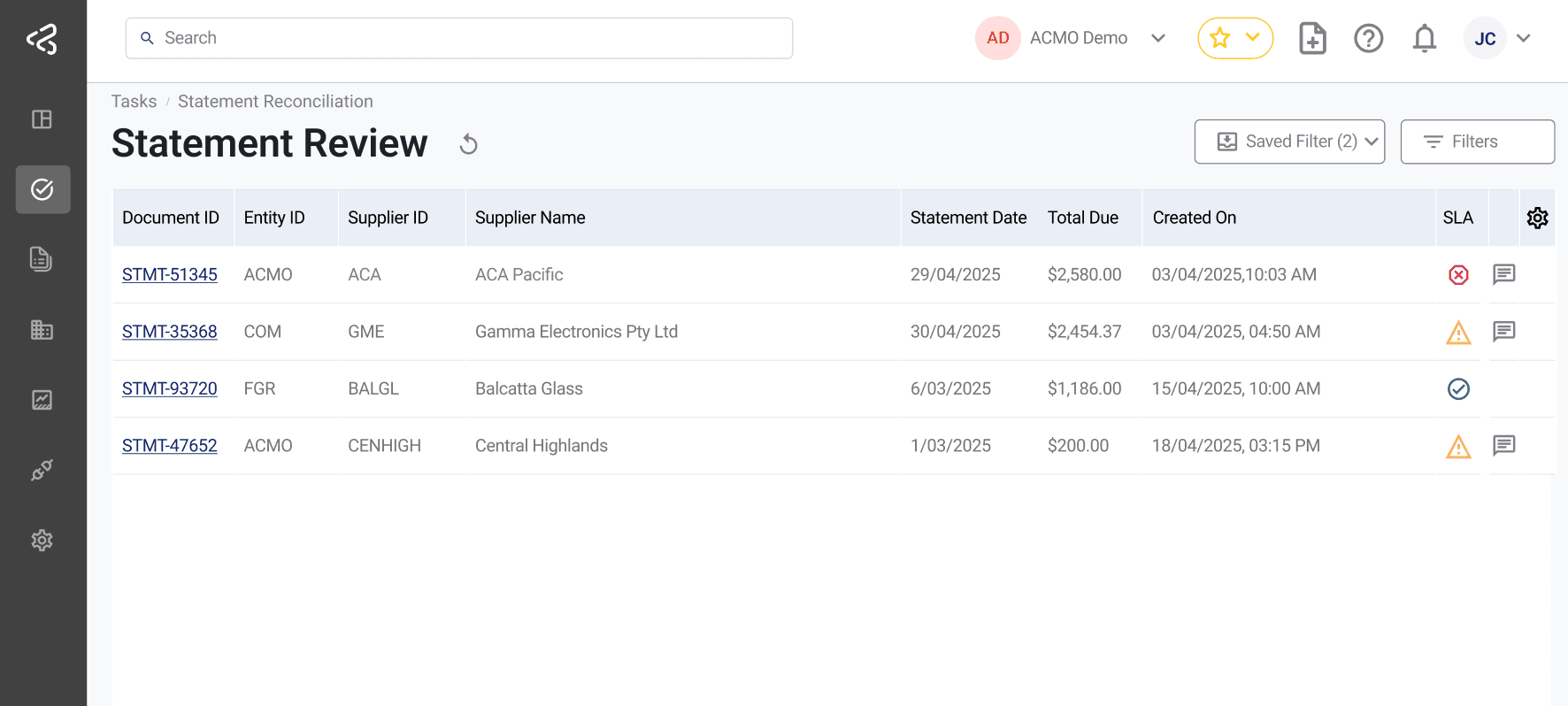
- Navigate to Tasks → Statement Reconciliation from the left-side menu.
- Select Statement Review under the available task list.
- Identify statement tasks using the “STMT” prefix.
- Click a Document ID to open and begin review.
Key Capabilities
Identify & Classify
- Automatically identifies supplier statements and assigns the “STMT” prefix for easy recognition and tracking.
- Extracts header and line-level details from statements.
- Classifies line items into statuses such as:
- Pending
- Completed
- Rejected
- Fraudulent
- Unknown
Reconciliation
- Automatically calculates Current amounts and Overdue amounts.
- Compares statement lines against AP and ERP records.
- Supports manual lookup where automatic matching is not sufficient.
- Routes each task to the appropriate AP user for focused processing.
Reviewing Statement Data
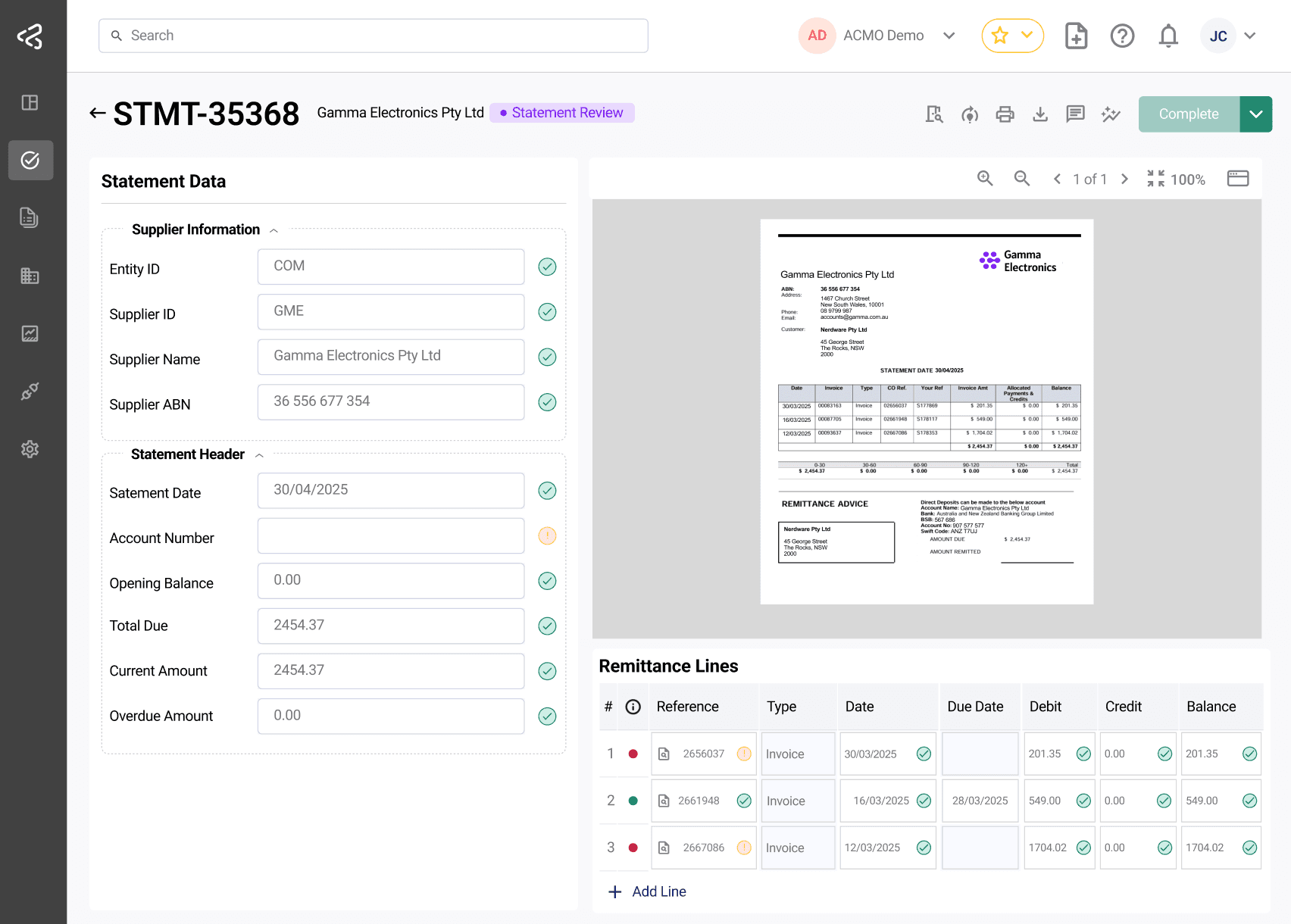
Once a statement is opened, the interface presents extracted data alongside the source document for validation and reconciliation.
Layout Overview
- Left Panel:
- Displays header details such as supplier, entity, and summary information.
- Right Panel:
- Includes the document viewer.
- Displays statement line items for reconciliation.
Line Item Indicators
- Each line item includes a status indicator (e.g., pending extraction, matching, coding).
- Visual cues (such as colors) help quickly identify items requiring attention.
Data Validation
Review and validate the following:
- Supplier details
- Statement balances and amounts
- Line item references (invoices, credits, payments)
- Due dates and statuses
The system automatically:
- Fetches due dates from linked bills (if available)
- Calculates current and overdue amounts using debit and credit entries
Lookup and Correction
Supplier Lookup
If the supplier is incorrect or missing:
- Use the Supplier Lookup option.
- Search and select the correct supplier.
- The header details are updated accordingly.
Bill Lookup
To match statement lines with internal records:
- Use the Bill Lookup option.
- Search and select the appropriate bill.
- Upon selection:
- Updates Supplier ID, Entity ID, Tax ID, and Bill Number
- Updates the due date based on the selected bill
Actions
Once validation is complete, users can perform the following:
-
Complete
- Marks the statement as validated and reconciled
- Moves it forward for downstream processing
-
Reject
- Used when discrepancies cannot be resolved
- Ensures incorrect or unmatched statements are not processed
-
A complete audit trail is maintained for all actions.
Processing Capabilities
- Supports Straight-Through Processing (STP) for automated reconciliation where matches are clear.
- Reduces manual intervention by handling fully matched statements automatically.
Straight-Through Processing (STP) may be configured based on business requirements and may not be enabled in all environments.
Post-Processing & Access
- Completed statements are available for download.
- Processed data can be accessed via APIs.
- Access is controlled through user roles and permissions, ensuring secure and governed usage.
Exception-Led Reconciliation
Statement Review shifts the approach from manual, line-by-line checking to an exception-led workflow:
- The system organises statement lines into meaningful outcomes
- Highlights only exceptions and unmatched items
- Enables users to focus on discrepancies rather than reviewing every line
This approach improves efficiency, reduces manual effort, and ensures accurate reconciliation across supplier statements.