Application Logs
The Application Logs screen under System Settings provides a centralized view of system activity, user actions, and operational events. It helps administrators monitor system behavior, audit actions, and troubleshoot issues.
Purpose
The Application Logs screen enables authorized users to:
- Review system-generated and user-generated logs
- Track audit trails and access activity
- Diagnose errors and monitor system health
- Filter logs to quickly find relevant events
Access to this screen is controlled by role-based permissions.
Application Logs Table
The main screen displays a table listing application logs.
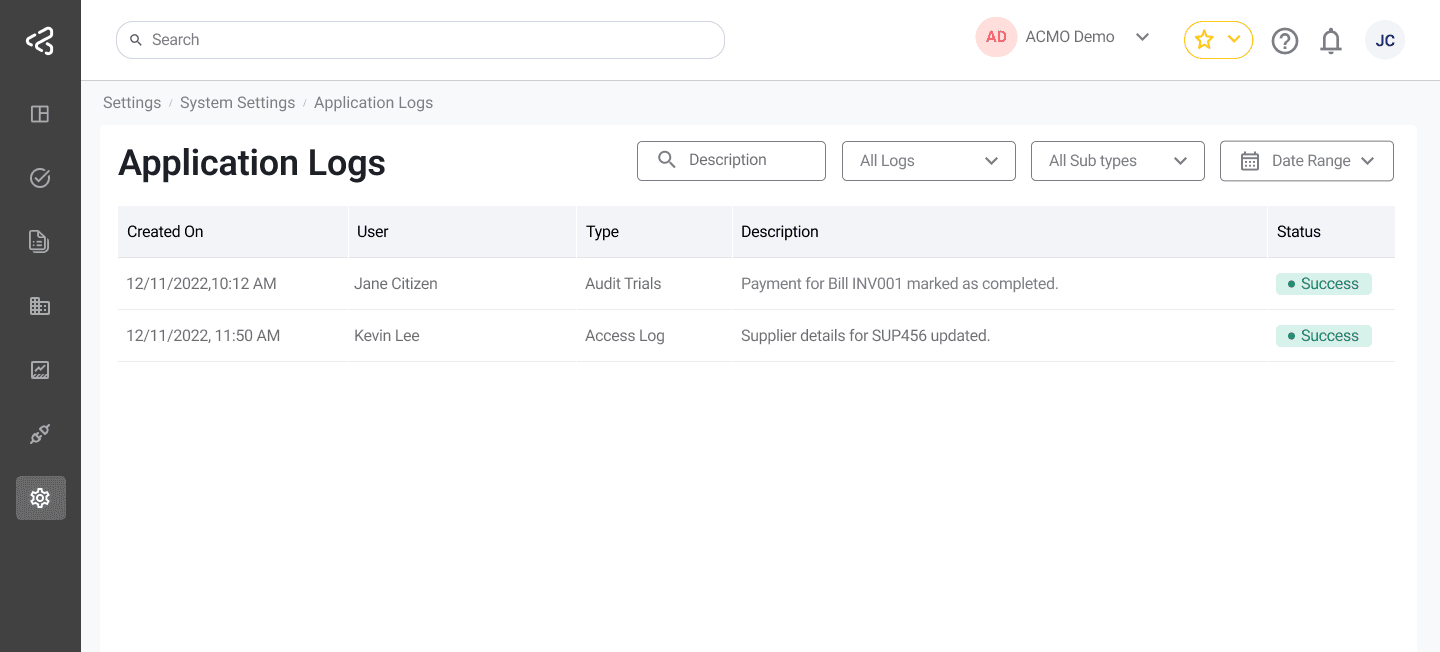
Table Columns
Each log entry includes the following information:
-
Created On
The date and time when the log entry was generated. -
User
The name of the user who performed the action.
Displays System if the log was generated automatically by the system. -
Type
The log category (for example, Audit Trails). -
Description
A brief description of the event (for example, Data review completed). -
Status
Indicates the outcome of the event (for example, Success, Error).
Filters
A comprehensive set of filters is available to refine the log results.
Search
- Search logs by description text
Log Type
Filter logs by category:
- Audit Trails
- Access Log
- System Log
- All Log Types
Log Sub Type
Filter logs by business or functional context:
- Supplier
- Purchase Order
- Customer
- Invoice
- Remittance
- Cash Allocation
- All Sub Types
Log Level
Filter logs based on severity or verbosity:
- Debug Logs
- Info Logs
- All Log Levels
Date Range
- Select a start date and end date using the calendar picker
- Filters logs generated within the selected date range
Summary
The Application Logs screen provides detailed insight into system operations and user activity. With powerful filtering options across log types, subtypes, levels, and date ranges, administrators can efficiently audit actions, investigate issues, and maintain system reliability.