Bill Document
The Bill Document page is the command centre for a single bill. It brings together everything ACMO has captured, processed, and actioned against the document—extracted data, matching and coding outcomes, approval routing, comments, and audit history—so users can understand a bill’s full lifecycle without leaving the page.
Accessing Bill Document
- Navigate to Documents → Bills from the left-hand menu.
- Click a Document ID in the listing to open the Bill Document page.
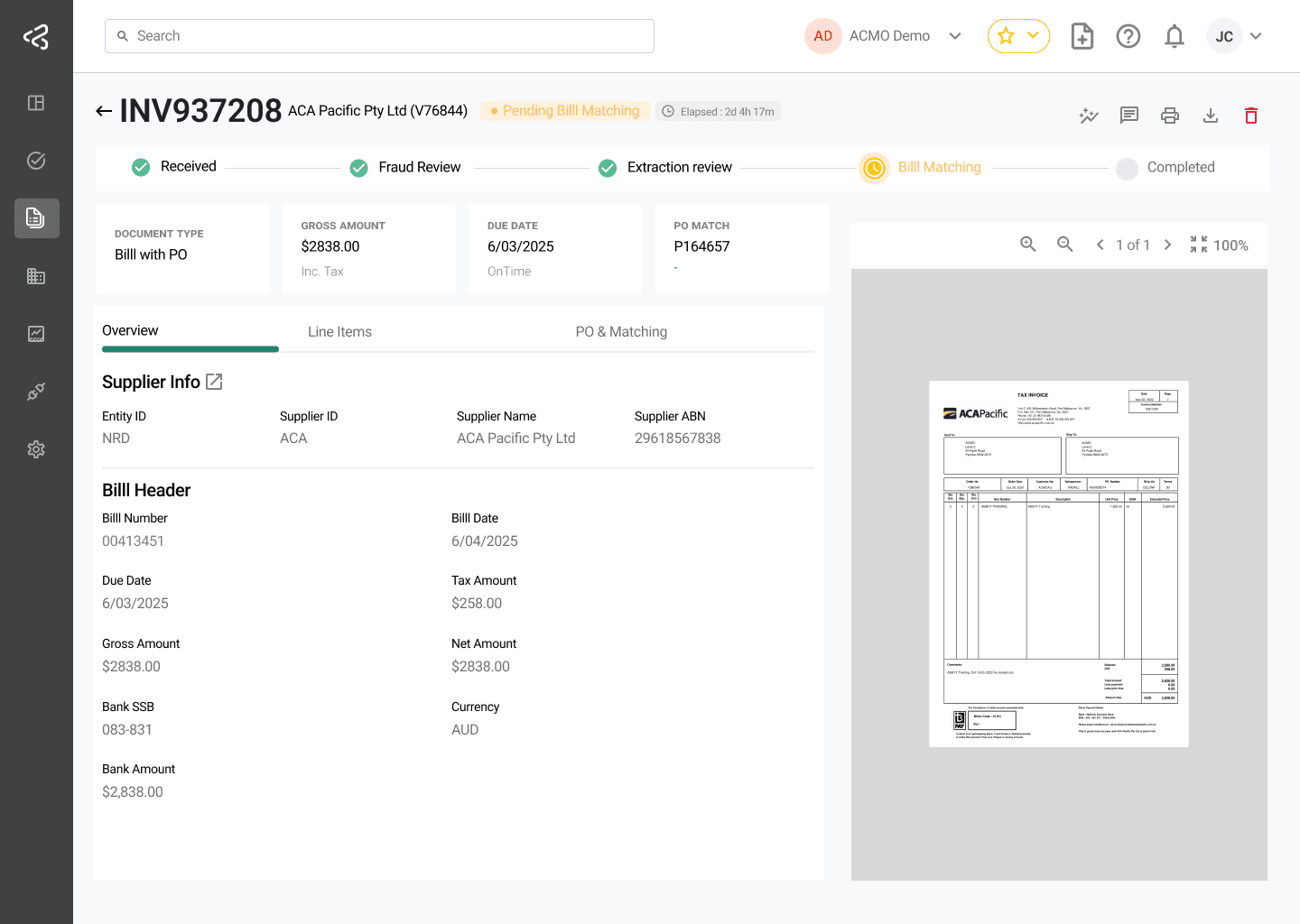
Page Header
The header provides an at-a-glance summary of the document and quick access to key actions.
- Bill Number - The bill number mentioned on the document.
- Supplier Name - The name of the supplier who issued the bill.
- Business Entity - The business entity to whom the bill was issued.
- Status - Reflects the bill’s current position in the workflow (for example, In Extraction Review, In Matching, Pending Approval, Completed, Rejected).
- Elapsed Time - The time elapsed since the document was received.
- Key Actions - Grouped toolbar actions such as Download, Print, Comments, and Audit Trail.
Document Lifecycle Timeline
A timeline is displayed prominently at the top of the page, showing the bill’s expected processing journey and where it currently stands.
Stages
The timeline reflects the path a bill takes based on its Document Type:
PO Bills
- Document Received
- Extraction Review
- Bill Matching
- Completed
Non-PO Bills
- Document Received
- Extraction Review
- GL Coding
- Bill Approval
- AP Review
- Completed
Timeline Behaviour
- Each stage is represented as a dot or milestone along the timeline.
- Completed stages are visually distinct from pending stages.
- The current active stage is clearly highlighted to display where the bill is right now.
- Rejected or failed stages use a distinct visual treatment (for example, a red indicator) so exceptions stand out immediately.
- Skipped stages (for example, AP Review when no dispute occurred) show similar styling to the completed stage.
Hovering Over a Stage
Hovering over a milestone shows contextual detail for the current stage or a rejected stage:
- Current stage - Current status and the assigned user, if available.
- Rejected stage - Rejected date/time, the user who rejected it, and the rejection reason (if provided).
Completed stages and stages not yet reached don’t display a tooltip on hover.
Processing Duration
- For completed or rejected bills, the timeline displays the total end-to-end processing duration, calculated from document creation to completion or rejection.
- For in-progress bills, the elapsed time since creation is displayed alongside the document status.
Summary Cards
Key bill values are surfaced as summary cards near the top of the page for quick reference without opening a detail tab:
- Gross Amount
- Tax Amount
- Due Date
- PO Number (PO Bills only)
- Supplier
- Match Outcome - Reflects matching status for PO Bills.
- GL Status (Non PO Bills only)
Document Preview Panel
The original bill document remains easily accessible alongside the extracted and processed data.
- Supports zoom, download, and print
- Can be expanded or collapsed depending on the section being reviewed
- Mirrors the document viewer controls available on task screens (next/previous page, zoom in/out, reset zoom, zoom to fit, open in separate window)
Detail Sections
The information from the bill is organised into a tab or section:
| Tab | Description |
|---|---|
| Overview | Displays the supplier, bill number, bill date, due date, and line items captured during Extraction Review. |
| Line Items | Displays bill line items, including quantities, prices, and tax codes. |
| PO & Matching Summary (PO Bills) | Displays the linked Purchase Order, matched PO lines, matching type (2-way or 3-way), and matching status. |
| Cost Allocation (Non-PO Bills) | Displays the cost allocation—GL accounts, cost centres, projects, or other configured financial dimensions—and the allocated balance. |
| Approvers | Displays the approval sequence, current approver, and approval status for Non-PO Bills. |
Certain tabs — for example, PO & Matching Summary, Cost Allocation, and Approvers — are only available once the bill reaches Completed status.
Rejected or Disputed Bills
- If a bill is rejected, the timeline shows a clear rejected state along with the reason provided at the time of rejection.
- If a bill is disputed during Bill Approval, the timeline reflects the AP Review exception stage, and the dispute reason is visible alongside the relevant milestone.
For details on how disputes and exceptions are handled, see Bill Approval and AP Review.
Completion Status
Once a bill reaches Completed status, the Bill Document page reflects the total end-to-end processing duration.
Learn more about ERP handoff on the Processed Data page.