Sessions
The Sessions screen under User Management provides visibility into all active user sessions in the ACMO Portal. It allows administrators to monitor user activity and force logoff sessions when required.
Purpose
The Sessions screen enables authorized users to:
- View currently active user sessions
- Monitor recent user access activity
- Log off one or more users from the system
Access to this screen is controlled by role-based permissions.
Sessions Listing
The main screen displays a table listing all active user sessions.
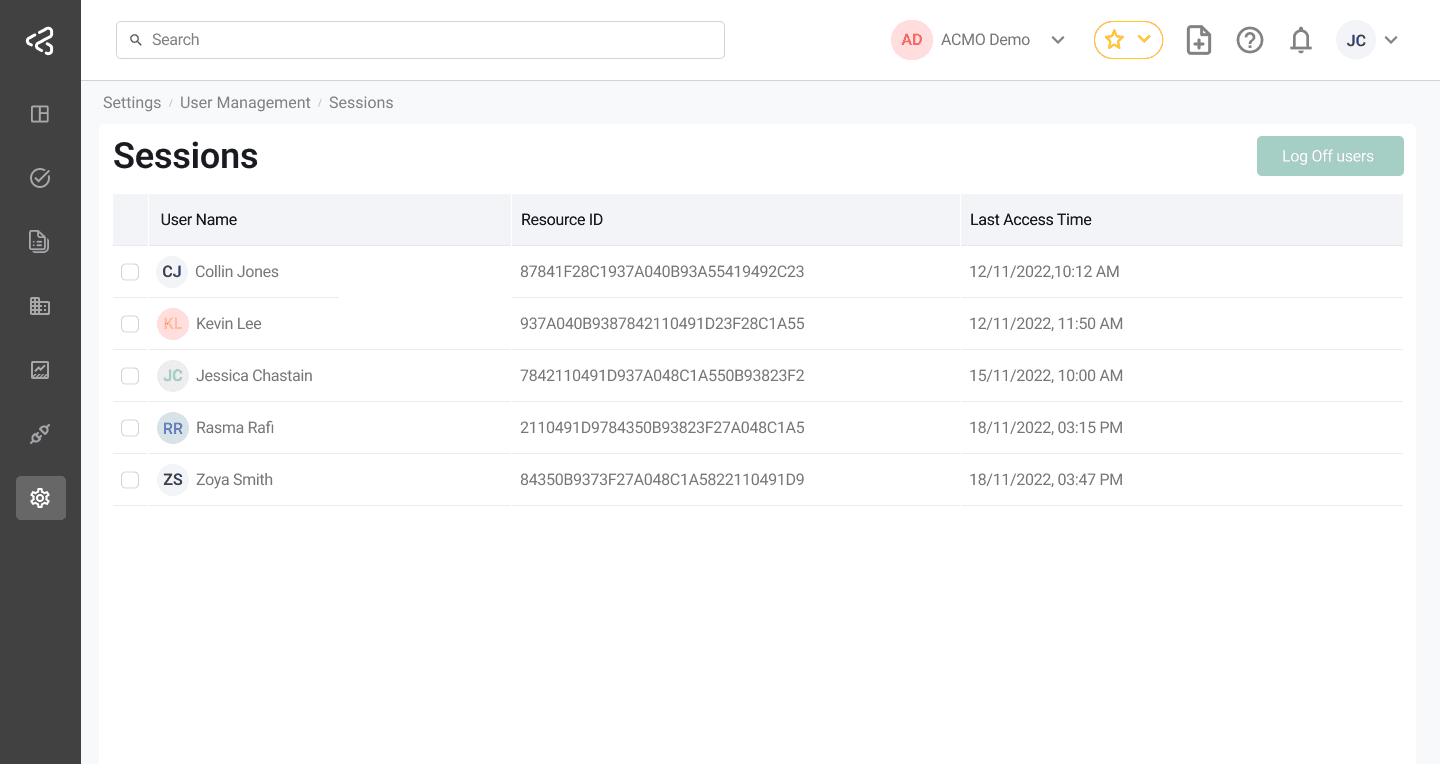
Table Columns
Each session is displayed with the following information:
-
Name
The name of the user associated with the session. -
Resource ID
The unique user resource identifier. -
Email
The user’s email address. -
Last Access Time
The most recent time the user accessed the system.
Session Actions
Select Sessions
- Each row includes a checkbox to select an individual user session
- A header checkbox in the table selects or deselects all sessions currently displayed
Log Off Users
- A Log Off Selected Users button is available above the table
- When clicked:
- All selected user sessions are terminated
- The affected users are logged out of the system immediately
This is useful for security enforcement, session cleanup, or responding to suspicious activity.
Summary
The Sessions screen provides administrators with real-time visibility and control over active user sessions. With bulk selection and forced logoff capabilities, it helps maintain system security and manage user access effectively.