Business Rules
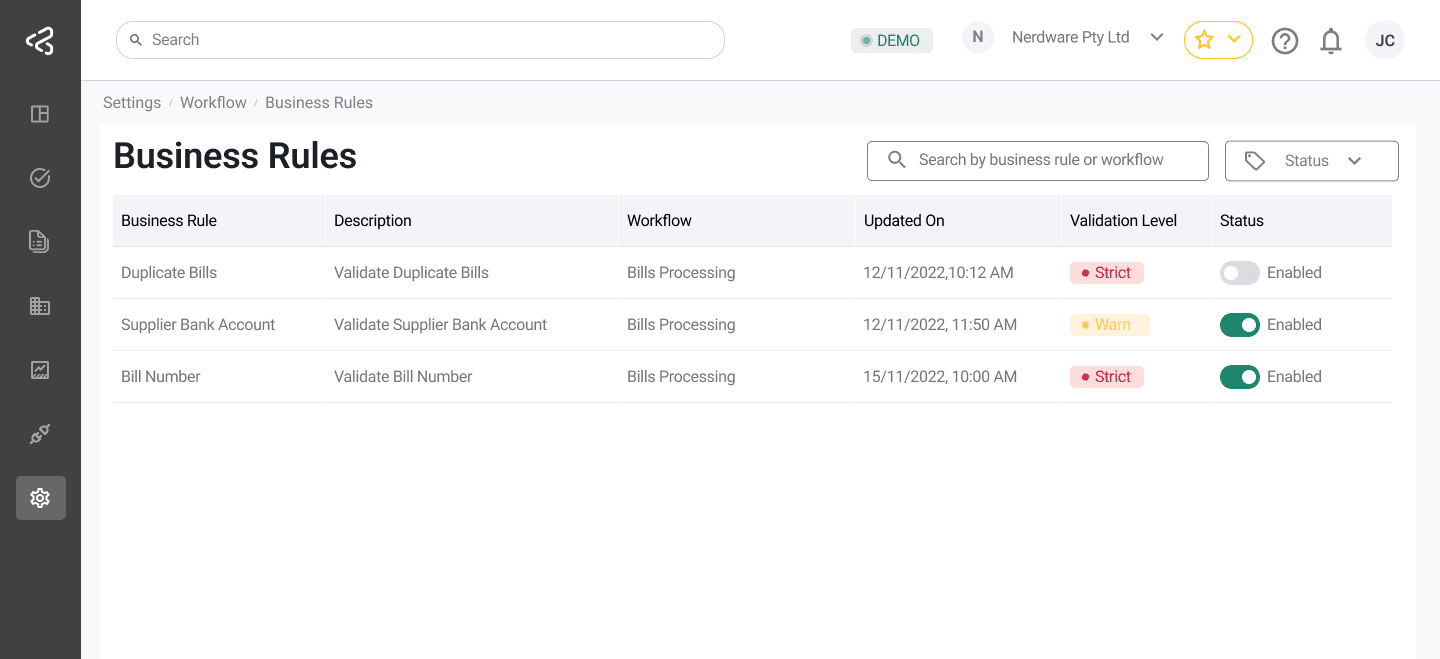
The Business Rules screen allows authorized users to view, enable, disable, and configure validation rules that control how data is processed within ACMO. These rules help ensure data accuracy, compliance, and consistency across workflows.
Business rules are module-specific and are displayed based on the user’s active subscriptions.
Purpose
The Business Rules screen enables users to:
- Enforce validation rules during bill or remittance processing
- Configure how strictly each rule is applied
- Control which rules are active or inactive
- Apply different rules depending on the subscribed modules
Access to this screen is controlled by role-based permissions.
Rule Visibility and Module Scope
- Business rules are displayed in a tabular format
- The rules shown depend on the user’s module subscriptions:
- If the user is subscribed to Accounts Payable (AP), AP-related rules are displayed
- If the user is subscribed to Accounts Receivable (AR), AR-related rules are displayed
This ensures users only see rules relevant to their operational context.
If the user is subscribed to both AP and AR, rules for both modules are shown
Table Structure
Each business rule is displayed as a row in the table with the following columns:
-
Business Rule
The name of the rule. Clicking the rule name opens a configuration panel. -
Description
A brief explanation of what the rule validates. -
Workflow
Indicates the workflow or process stage where the rule is applied. -
Status
A toggle switch used to enable or disable the rule. -
Updated On
The date when the rule was last modified.
Rule Configuration
Strict vs Warning Rules
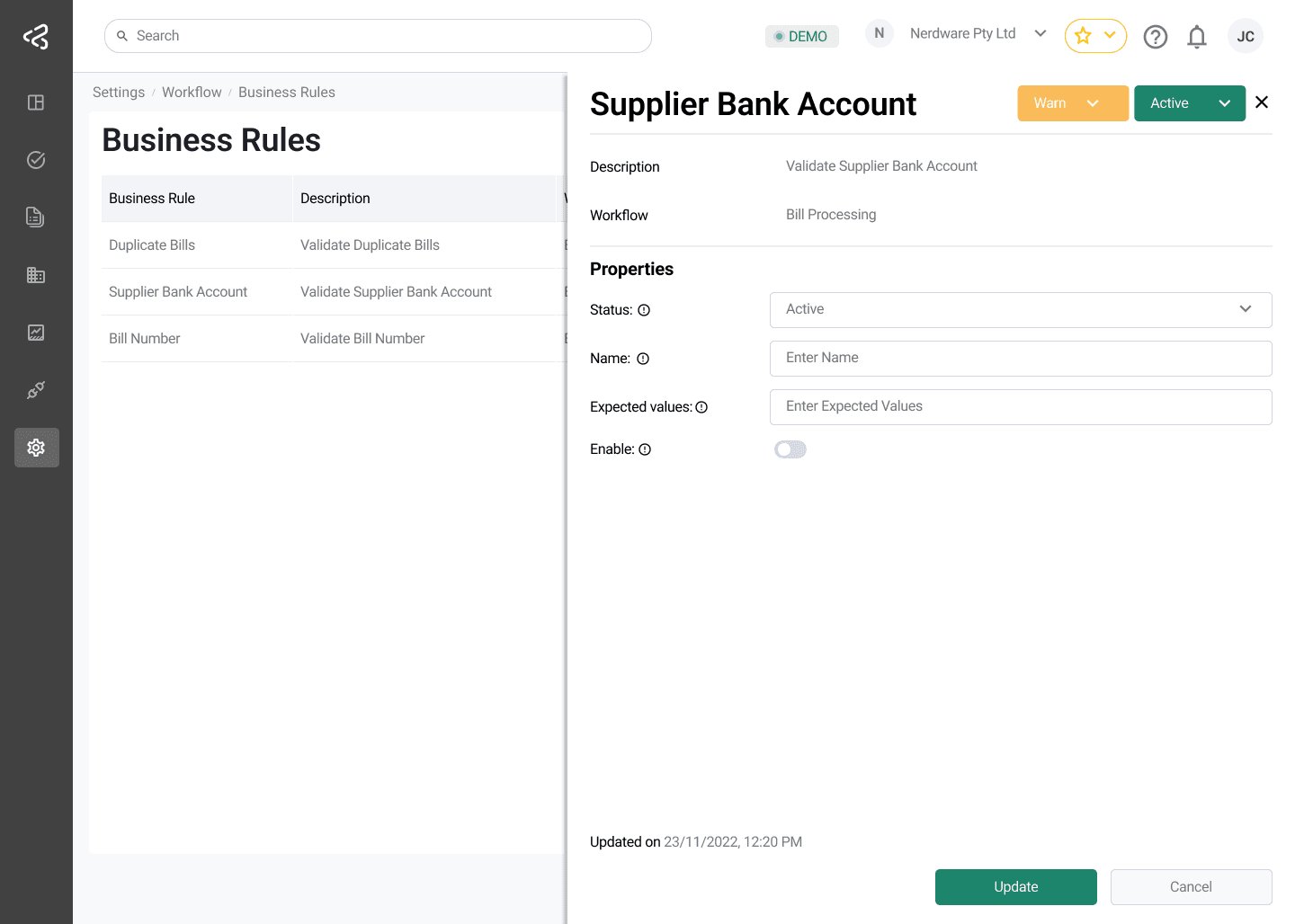
- Clicking on a Business Rule name opens a configuration panel from the right side of the screen
- Each rule can be configured as:
- Strict — the rule must be satisfied for the process to continue
- Warning Only — the rule raises a warning but does not block the workflow
This allows organizations to balance enforcement with operational flexibility.
Enabling and Disabling Rules
- Each rule includes a status switch in the Status column
- Users can:
- Enable a rule to apply it during processing
- Disable a rule to exclude it from validation
Changes take effect immediately for status updates.
Accounts Payable Business Rules
The following rules apply to the Accounts Payable module:
| Rule | Description |
|---|---|
| Duplicate Bills | Identifies and validates duplicate bills |
| Bill Number | Validates the bill number format and presence |
| Validate Business Entity | Ensures the business entity information is valid |
| Bills Date | Validates bill dates |
| Tax Amount | Validates tax amounts on bills |
| Bills Header Amounts | Validates bill header amounts |
| Bills Net Amounts | Validates consistency between bill header and line net amounts |
| Bills Line Total | Validates individual bill line totals |
| Bills Header Total | Validates gross amounts and ensures the sum of line gross amounts matches the header |
| Validate Supplier | Validates the supplier by cross-referencing master data and checking whether the supplier is active or disabled |
| Supplier Bank Account | Validates that supplier bank account details on the bill match the master data |
| Purchase Order | Validates whether the referenced purchase order exists and is valid |
| Validate ABN | Periodically validates the supplier’s GST registration or tax ID against the ABR to ensure it is valid and not cancelled |
| Validate ABN Status | Compares the ABN from the Bill against the master record. It flags a warning if the ABN does not match |
| Validate PO Status | Allows users to configure acceptable PO statuses during extraction review via the right-side panel |
| Validate GL Coder | Validates that the bill includes a valid GL coder that exists in the system |
| Mandatory Line Item | Ensures the bill has at least one line item |
Accounts Receivable Business Rules
The following rules apply to the Accounts Receivable module:
| Rule | Description |
|---|---|
| Mandatory Customer ID | Ensures the customer ID is present |
| Valid Customer ID | Ensures the customer ID exists in master data |
| Mandatory Payment Amount | Ensures the payment amount is present |
| Mandatory Line Items | Ensures the remittance has line items |
| Totals Must Match Payment Amount | Ensures the sum of line gross amounts matches the payment amount |
| Valid Invoice Numbers | Ensures the invoice number is valid |
| Optional Business Entity Validation | Ensures the business entity information is valid |
Supplier Statement Reconciliation Business Rules
| Rule | Description |
|---|---|
| Validate Business Entity | Ensures the business entity information is valid |
| Validate Supplier | Validates the supplier by cross-referencing |
| Validate Bill Number | Validates the bill number, or if a bill exists for the supplier in question |
| Statement Line Total | Validates the statement line total |
| Statement Header Total | Validates the statement header total |
| Mandatory Line Item | Ensures the statement has at least one line item |
Summary
The Business Rules screen provides fine-grained control over how validations are applied across Accounts Payable and Accounts Receivable workflows. By enabling, disabling, and configuring rules as strict or warning-only, organizations can enforce compliance while maintaining operational flexibility.