Delegation of Authority
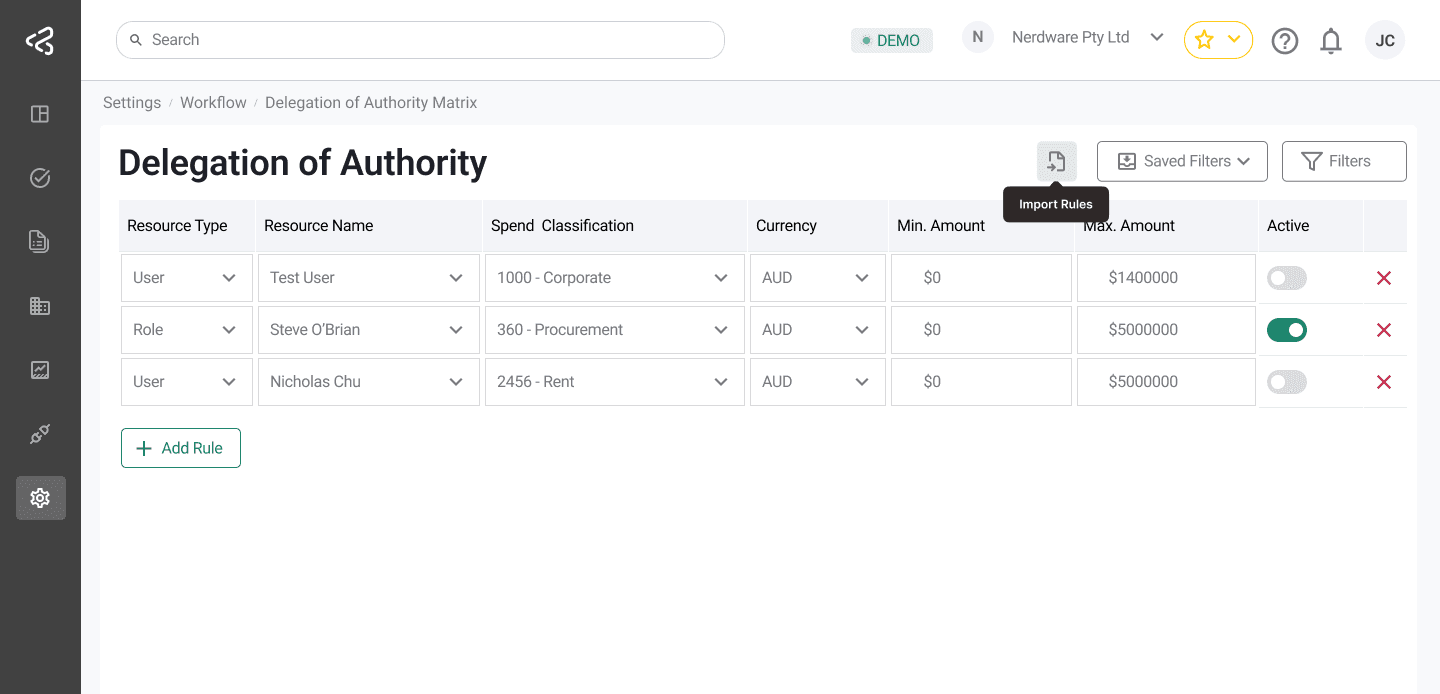
The Delegation of Authority (DOA) screen allows organizations to control and automate approval workflows by defining approval rules based on users or roles, account classifications, and monetary thresholds. These rules determine who is responsible for approving transactions within specified limits.
Purpose
The Delegation of Authority screen enables users to:
- Define approval responsibilities based on users or roles
- Configure approval limits using minimum and maximum amounts
- Control approval routing logic
- Activate or deactivate approval rules as needed
- Import approval rules in bulk using an Excel template
Access to this screen is controlled by role-based permissions.
Rule Activation
- Each rule can be enabled or disabled using a switch in the Active column.
- Only active rules are considered during approval workflow execution.
Module-Based Configuration
The columns displayed in the DOA table depend on the configuration selected in Module Settings:
- If Area Based Coding is configured:
- The Spend Classification column is displayed
- If Financial Coding is configured:
- Cost Distribution accounts are displayed instead
This dynamic behavior ensures the DOA configuration aligns with the active accounting model.
Routing Methods
Delegation of Authority supports two approval routing methods:
Minimum Routing
- The approver is selected based on the lowest minimum amount configured for the applicable amount range.
- Used when a single approver is sufficient for authorization.
Full Hierarchy Routing
- All approvers responsible for the applicable amount bracket are included.
- Approval is routed through the entire hierarchy for the relevant spend classification or account.
DOA Rules Table
Each row in the table represents a Delegation of Authority rule. The table includes the following columns:
Resource Type
- Dropdown with the following options:
- User
- Role
- Determines whether the approval is assigned to an individual user or a role.
Resource Name
- Options depend on the selected Resource Type:
- If User is selected, a list of users is displayed
- If Role is selected, a list of roles is displayed
Spend Classification / Cost Distribution
- Displays based on module configuration:
- Spend Classification (for Area Based Coding)
- Cost Distribution accounts (for Financial Coding)
- The selection menu displays accounts in a tree structure, with child accounts nested under parent accounts.
Currency
- Dropdown with supported currencies:
- AUD
- NZD
Minimum Amount
- Input field defining the minimum transaction value for which the rule applies.
Maximum Amount
- Input field defining the maximum transaction value for which the rule applies.
Active
- Toggle switch to enable or disable the rule for the selected account and amount range.
Delete Rule
- An “X” icon is available at the end of each row
- Allows users to remove a rule from the table
Managing Rules
Add Rule
- Users can add a new rule by clicking the Add Rule button below the table
- Each added row represents a new DOA configuration
Filters
- Filters are available in the top-right corner of the screen
- Used to quickly locate and refine rules based on configured criteria
Import Rules
- An Import icon is available next to the filter controls
- Allows users to upload an Excel file containing DOA rules
- When the import panel opens:
- A sample template is provided
- The template can be downloaded, populated, and uploaded for bulk rule creation
Summary
The Delegation of Authority screen provides a flexible and powerful way to manage approval workflows. By combining user or role-based assignment, account classification, currency, and amount thresholds—with support for hierarchical routing and bulk imports—organizations can precisely control how approvals are handled across the system.