Accounts Payable Overview
The Accounts Payable (AP) module in the ACMO All-in-One Business Suite is purpose-built to streamline and automate the end-to-end bill processing lifecycle—from invoice capture to approval and ERP handoff for payment.
Designed for modern finance teams, the module reduces manual effort, increases accuracy, and provides full visibility into payables, helping organizations process invoices faster while maintaining strong financial controls.
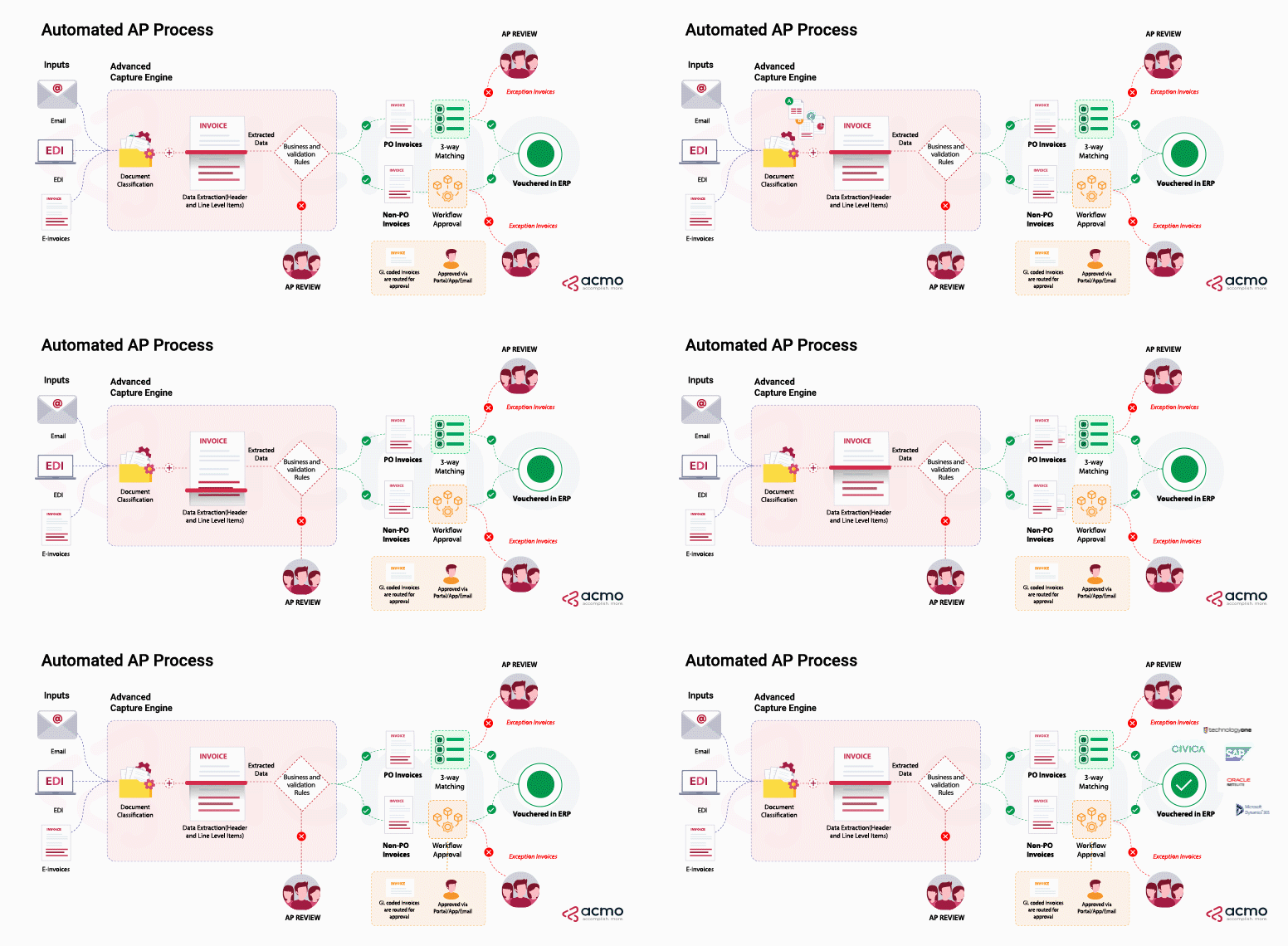
Bill Processing
The Bill Processing section provides an overview of how bills move through the Accounts Payable workflow in the ACMO Solution. Once bill data is ingested and extracted using OCR, AI, and Machine Learning, each bill follows a defined processing path based on its Document Type.
Bills are processed differently depending on whether they are linked to a Purchase Order (PO) or not.
After extraction, bills are classified as one of the following:
- PO Bill – A bill linked to a Purchase Order
- Non-PO Bill – A bill without an associated Purchase Order
This classification determines which tasks are required before the bill can be posted or sent for payment.
PO Bill Workflow
PO Bills follow a matching-based workflow, where validation is performed against procurement data.
Typical PO Bill Flow:
- Extraction Review
- Bill Matching
- AP Review
Non-PO Bill Workflow
Non-PO Bills follow a coding- and approval-based workflow, as no Purchase Order is available for validation.
Typical Non-PO Bill Flow:
- Extraction Review
- GL Coding
- Bill Approval
- AP Review
Key Differences
| Area | PO Bills | Non-PO Bills |
|---|---|---|
| Purchase Order | Required | Not required |
| Primary Validation | PO / Goods Receipt Matching | GL Coding and Approval |
| Matching Task | Bill Matching | Not applicable |
| GL Coding | Not Applicable | Mandatory |
| Approval | Not required | Mandatory |
Key Capabilities
- Invoice Ingestion & Data Extraction
- Upload or ingest vendor invoices in multiple formats (PDF, scanned documents, electronic invoices).
- Automatically extract key invoice data such as vendor details, amounts, dates, and line items.
- Automated Matching & Validation
- Validate invoices against purchase orders, goods receipts, and predefined company rules.
- Support two-way and three-way matching to ensure accuracy before approval.
- Approval Workflow Automation
- Route bills through configurable approval workflows based on amount, vendor, or business rules.
- Accelerate approval cycles while maintaining auditability and compliance.
- Error, Duplicate, and Fraud Prevention
- Detect duplicate invoices and potential anomalies early in the process.
- Reduce the risk of overpayments and fraudulent transactions.
- ERP Integration & Payment Readiness
- Ensure invoices are fully matched, coded, and approved before being sent to the ERP for payment.
- Maintain clean, consistent data flowing into downstream financial systems.
Business Benefits
- Reduced Manual Effort through automation of data entry and validation
- Improved Financial Accuracy by enforcing matching and approval controls
- Faster Processing Cycles leading to timely payments and fewer bottlenecks
- Enhanced Vendor Relationships through predictable and accurate payments
- Clear Visibility into Liabilities with real-time insight into outstanding bills and approval status
The Accounts Payable module in AIO empowers finance teams to operate more efficiently, strategically, and confidently—turning a traditionally manual process into a streamlined, intelligent workflow.