Manage Tolerance
The Manage Tolerance screen under the Tolerance settings allows administrators to define acceptable variance limits used during bill validation and matching. Tolerances help handle minor differences caused by rounding, tax calculations, or pricing discrepancies without blocking processing.
Purpose
The Manage Tolerance screen enables authorized users to:
- Configure tolerance rules for PO Bills and Non-PO Bills
- Define acceptable variance thresholds using dollar amounts and/or percentages
- Enable or disable tolerance enforcement across the system
Access to this screen is controlled by role-based permissions.
Tolerance Types
The screen is divided into two main sections based on bill type:
- PO Bills
- Non-PO Bills
Each section provides configurable tolerance options that can be enabled independently.
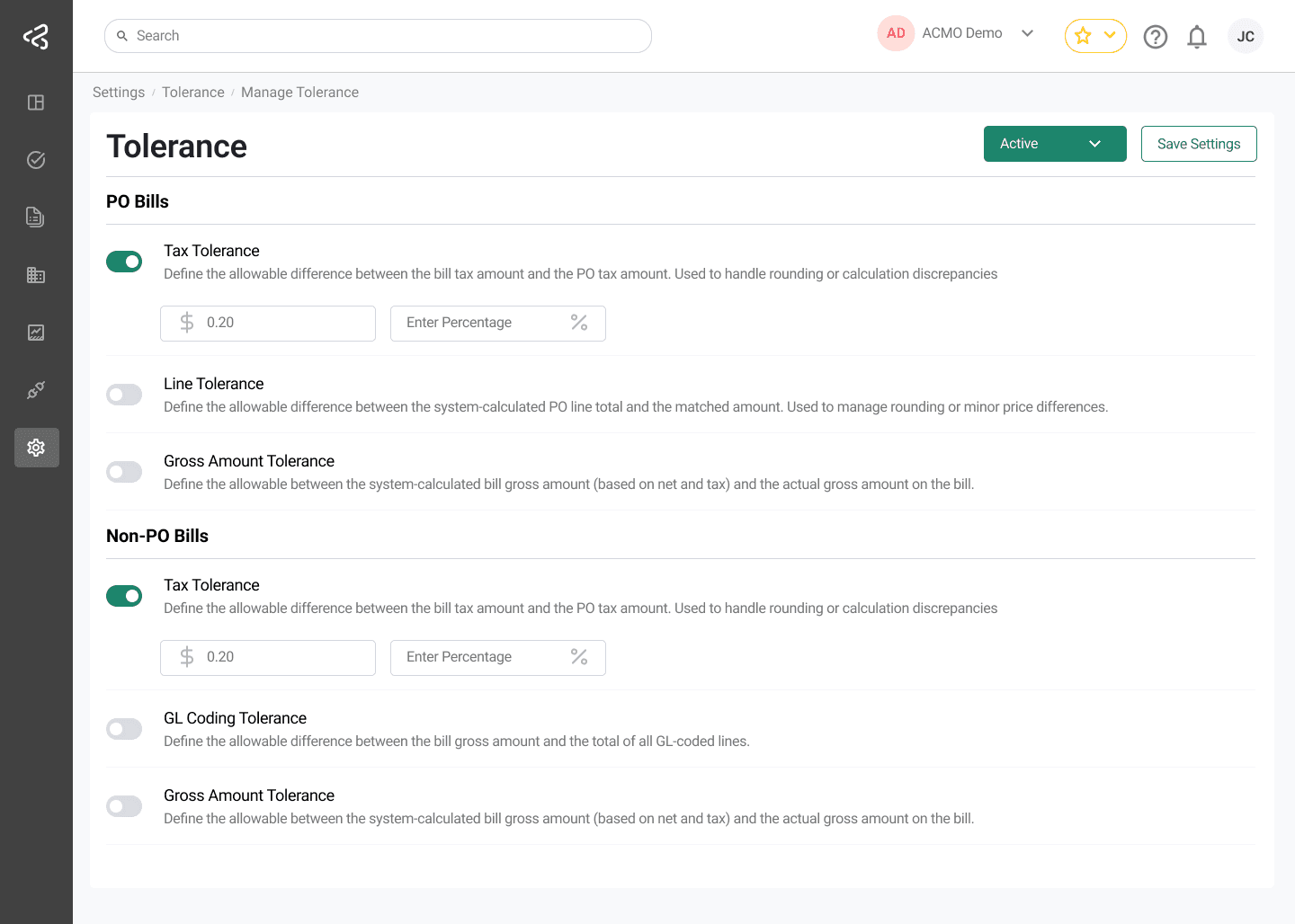
PO Bills Tolerance
The following tolerance options are available for Purchase Order (PO) Bills:
Tax Tolerance
- Defines the allowable difference between:
- The bill tax amount, and
- The PO tax amount
- Used to handle rounding or tax calculation discrepancies
Line Tolerance
- Defines the allowable difference between:
- The system-calculated PO line total, and
- The matched bill line amount
- Used to manage rounding differences or minor price variances
Gross Amount Tolerance
- Defines the allowable difference between:
- The system-calculated bill gross amount (based on net and tax), and
- The actual gross amount on the bill
Non-PO Bills Tolerance
The following tolerance options are available for Non-PO Bills:
Tax Tolerance
- Defines the allowable difference between:
- The bill tax amount, and
- The calculated tax amount
- Used to handle rounding or calculation discrepancies
GL Coding Tolerance
- Defines the allowable difference between:
- The bill gross amount, and
- The total of all GL-coded line amounts
Gross Amount Tolerance
- Defines the allowable difference between:
- The system-calculated bill gross amount (based on net and tax), and
- The actual gross amount on the bill
Tolerance Values
- Each tolerance option includes a toggle to enable or disable it
- When enabled, two input fields are displayed:
- Dollar Amount
- Percentage
- Users can define:
- Only a dollar value
- Only a percentage
- Both dollar and percentage values
The system uses these values to determine whether a variance is acceptable.
Tolerance Actions
At the top-right corner of the screen, the following controls are available:
-
Tolerance Status Menu
A menu to activate or disable tolerance across the system -
Save Settings
Saves and applies all tolerance configuration changes
Summary
The Manage Tolerance screen provides granular control over acceptable variances for PO and Non-PO bills. By configuring tolerance thresholds using dollar amounts and percentages, organizations can prevent unnecessary exceptions while maintaining financial accuracy and control.