General Settings
The General Settings section is available under the Module Settings card on the Settings page. It provides organisation-level configuration that applies across both the AP and AR modules.
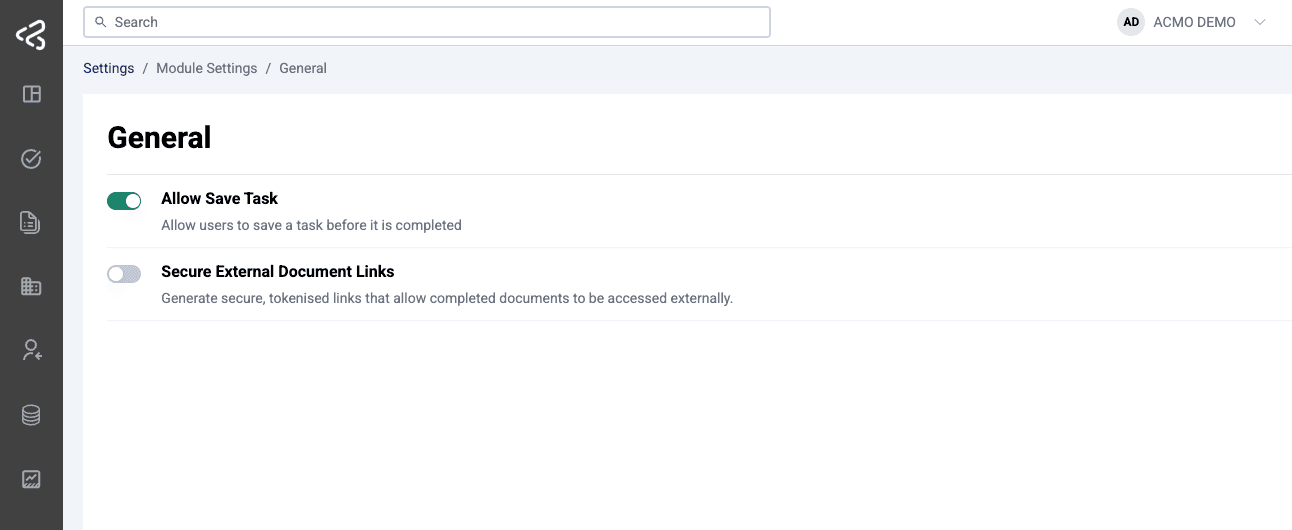
Access to this screen is controlled by role-based permissions.
Save Feature
Currently, one configurable setting is available to all users, regardless of whether they are using the AP or AR module.
Overview
The Save feature allows users to save a task before it is fully completed. This functionality operates at the organisation level, meaning:
- Saved tasks are accessible to all users within the same organisation.
- Any updates made to a saved task are visible to other users.
- Work can be resumed seamlessly from where it was left off.
This capability helps reduce rework and improves collaboration across teams.
Enabling or Disabling the Feature
- Admins can turn the Save feature on or off organisation-wide from General Settings.
- Access to General Setting is managed through Settings > User Management > Roles.
When the feature is disabled:
- The Save and Clear options are removed from all supported task screens.
- Users will no longer be able to save tasks in progress.
Saving Changes

- Click the green floppy disk icon to save the current progress of a task.
- Saved data is stored and can be accessed by other users within the same organisation.
- Users can pause and resume work without losing progress.
Clearing Changes
- Click the red U-turn arrow icon to clear any saved or in-progress changes.
- This resets the task to its original state.
Unsaved Changes Prompt
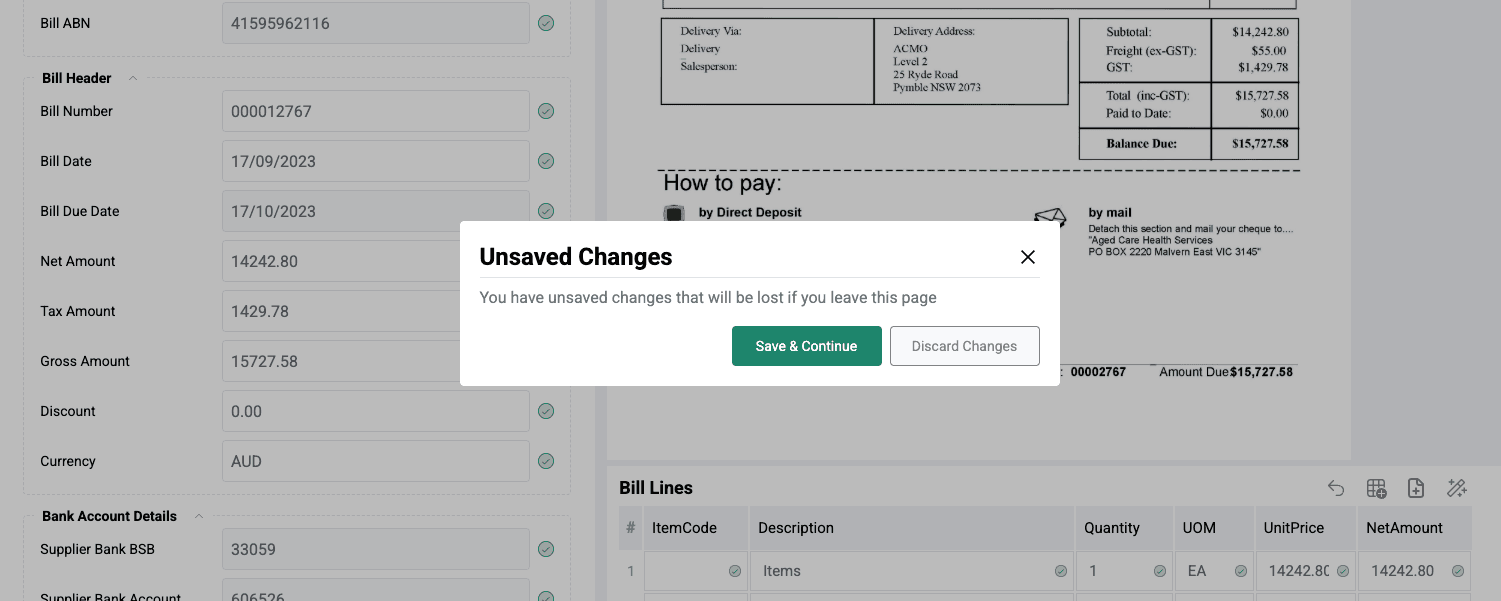
If a user attempts to navigate away or perform an action without saving:
- A popup prompts the user to save any unsaved changes.
- Users can choose to save or discard their changes before proceeding.
Supported Task Types
The Save functionality is currently supported for the following task types:
AP Module
- Extraction Review
- Bill Matching
- GL Coding
- AP Review
AR Module
- Remittance Review
Key Outcomes
- Enables collaboration across users within the same organisation
- Reduces duplication of effort and rework
- Allows users to pause and resume tasks efficiently
- Ensures continuity in task processing
Secure External Document Links
Secure External Document Links is a toggleable setting available in General Settings that generates secure, tokenised links for completed documents, allowing them to be accessed externally.
Overview
- When enabled, ACMO generates a secure, tokenised link for each completed document.
- The link is included in the processed output JSON.
- When the output is posted to the customer’s ERP, the secure link is delivered alongside the document, giving the ERP (and its users) access to the document externally without requiring a login to the ACMO portal.
Documents that are still in progress are not eligible for secure external links. Only completed documents are included with a secure link in the processed output.
Enabling or Disabling the Feature
- Admins can turn Secure External Document Links on or off organisation-wide from General Settings.
- When disabled, the processed output JSON will not include a secure external link for the document.
Access Control
Access to the Save feature and Secure External Document Links is controlled at two levels:
- General Settings — Admins enable or disable each feature organisation-wide.
- Settings > User Management > Roles — Admins can grant or restrict specific roles’ ability to toggle these settings themselves, allowing controlled delegation without requiring full Admin privileges.
Notes
- The Save feature and Secure External Document Links both apply globally at the organisation level.
- Changes to these settings impact all users and supported task types immediately.