Fraud Review
The Fraud Review task enables users to analyse bills for potential fraud indicators before they proceed further in the Accounts Payable workflow. It highlights risk signals detected using advanced analysis techniques, helping users make informed decisions on whether a bill is safe to process.
This task is available only when the Fraud Check add-on product is subscribed and enabled.
If you are not using or have not subscribed to the Fraud Check add-on, you can skip this step and proceed directly to Extraction Review
When Is Fraud Review Required?
- Fraud Review applies only to bills processed under the Fraud Check add-on.
- Bills flagged with potential risk indicators are routed to this task for validation.
- This step ensures that suspicious or manipulated documents are identified early in the workflow.
Accessing Fraud Review
- Navigate to Tasks → Accounts Payable from the left-side menu.
- Click Fraud Review under Accounts Payable to view bills pending analysis.
- Review the task list to identify bills requiring attention.
- Click a Bill ID to open and begin the fraud analysis.
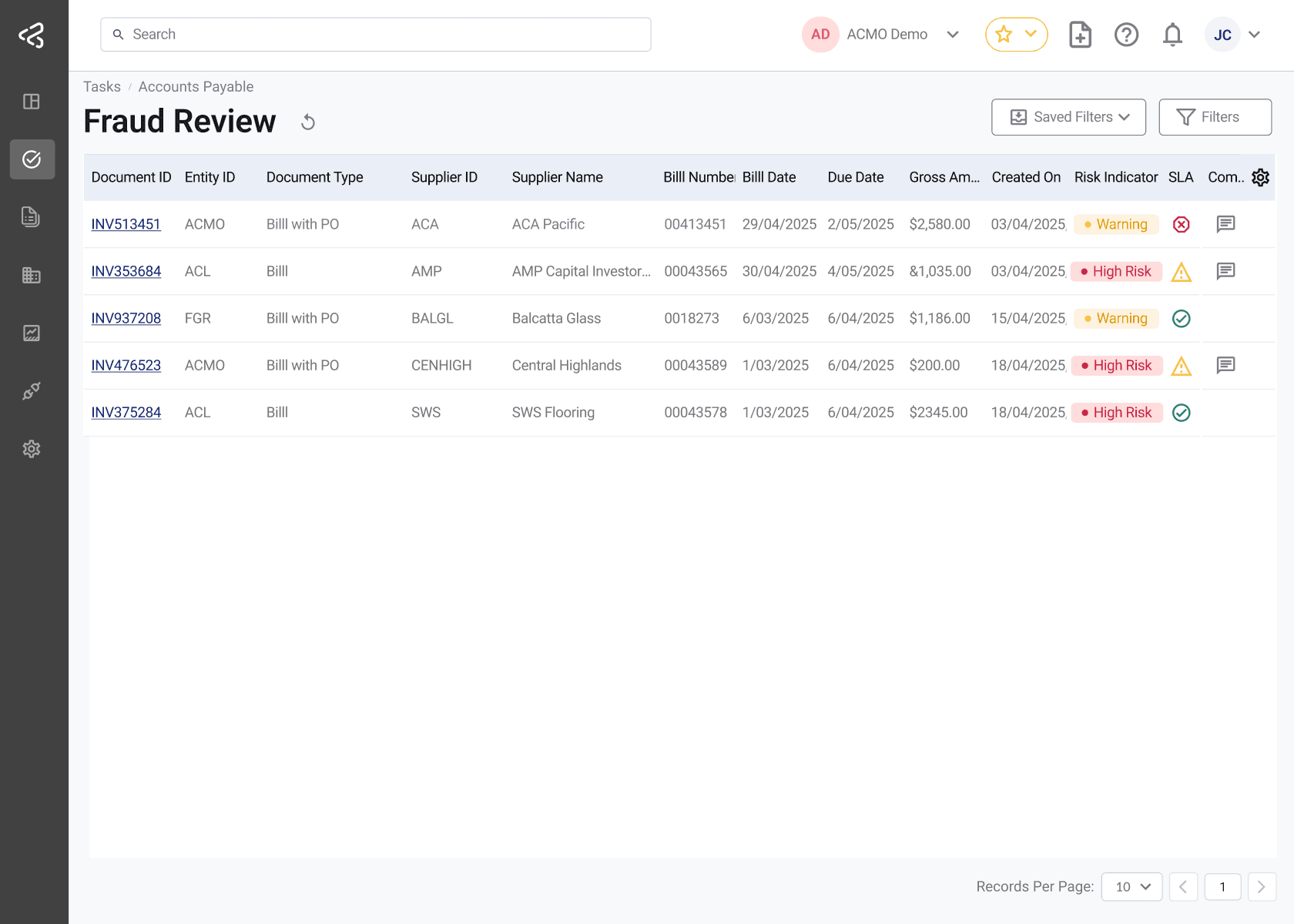
Use the comments icon in the table to quickly view any comments added to a task; the icon will appear in a row only when comments are available.
This task uses the standard filter set. For detailed information, refer to the Task Filters documentation.
Analysing Fraud Indicators
Once a bill is opened, the system presents detected fraud indicators alongside the document to support decision-making.
Key Risk Indicators
Users can review various system-generated signals, including:
- Content Edits - Detects whether the document content has been modified
- PDF Generation Source - Identifies the software used to create the document
- Edited Areas - Highlights specific regions in the document where changes may have occurred
- Data Inconsistencies - Flags mismatches or unusual patterns in bill data
These indicators help determine the authenticity and reliability of the bill.
Reviewing Bills in Fraud Review
The Fraud Review task is a read-only review step focused solely on evaluating system-detected risk indicators.
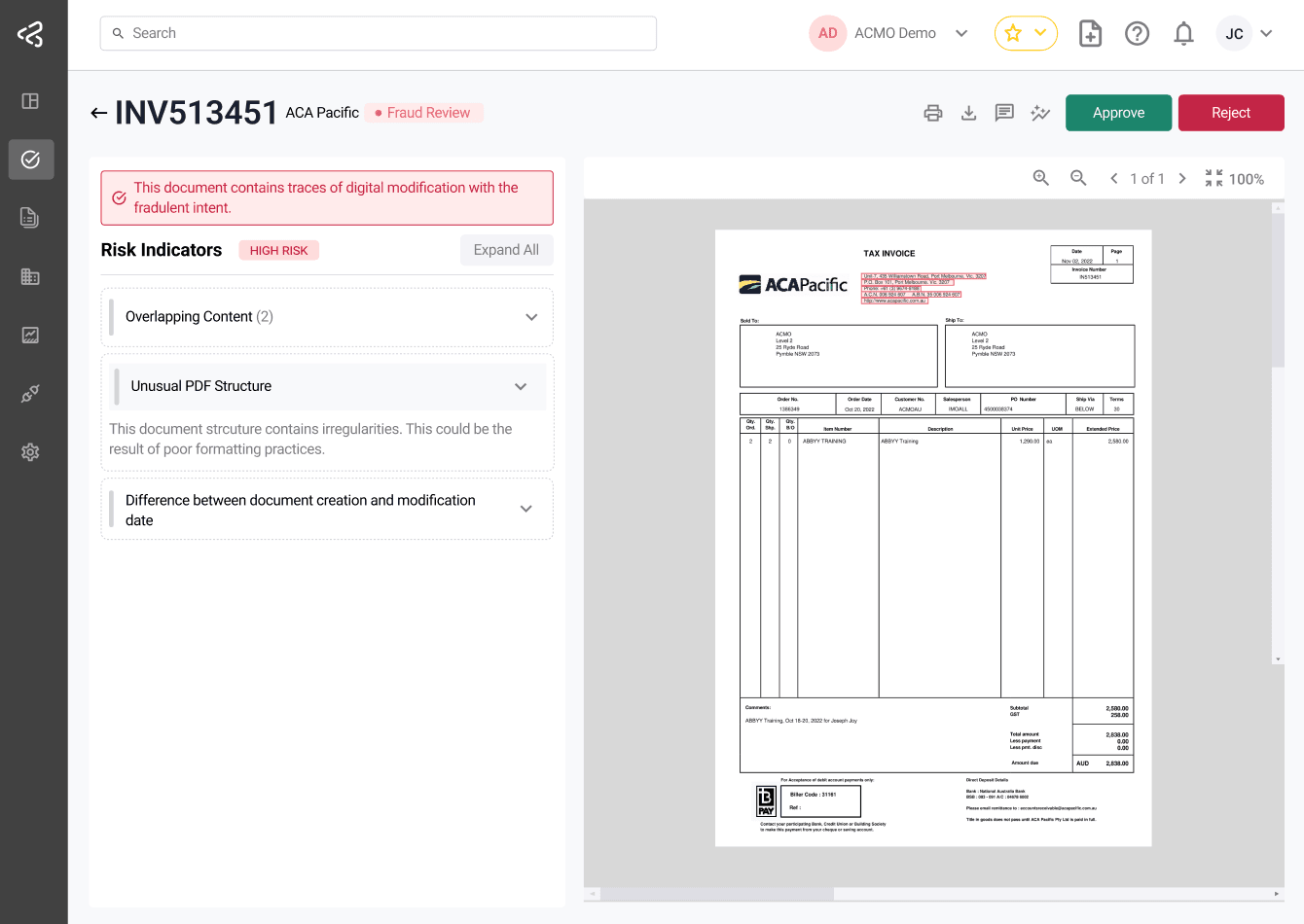
Screen Overview
-
Left Panel (Risk Indicators)
- Displays all detected fraud signals
- Highlights potential risks such as content edits, modified areas, and document metadata
- Serves as the primary basis for decision-making
-
Right Panel (Document Viewer)
- Displays the original bill document
- Allows users to visually inspect the document alongside the highlighted indicators
- Includes standard viewer controls such as zoom and navigation
What Users Can Do
Users are expected to:
- Review the fraud indicators provided by the system
- Examine the document visually for any suspicious patterns
- Make a decision based on the insights provided
Document Viewer Controls
The document viewer provides tools to assist with detailed inspection:
- Navigate between pages
- Zoom in and out
- Reset zoom to default view
- Fit document to screen
These controls help users closely examine flagged areas and supporting details.
Decision Actions
After reviewing fraud indicators and bill details, users can take one of the following actions:
- Accept
- Confirms that no significant fraud risk is identified
- The bill proceeds to the next stage (e.g., Extraction Review)
- Reject
- Used when fraud indicators suggest the bill is fraudulent or invalid
- A reason must be provided for audit and tracking purposes
- The bill is removed from further processing
Best Practices
- Carefully review all highlighted risk indicators before making a decision
- Cross-check document data with known supplier records where possible
- Use Reject only when there is clear evidence or strong suspicion of fraud
- Provide meaningful comments when rejecting a bill for better audit tracking
Outcome of Fraud Review
- Accepted bills move forward in the workflow for further validation and processing
- Rejected bills are flagged as invalid and excluded from downstream processing
This step strengthens financial controls by preventing fraudulent or manipulated documents from entering the system.