Supplier Statement Report
The Supplier Statement Report provides visibility into all supplier statements processed within the Statement Reconciliation module. It enables users to monitor reconciliation outcomes, track discrepancies, and analyse statement-level and line-level statuses.
Access to this screen is controlled by role-based permissions.
Overview
The Supplier Statement Report lists all processed and in-progress supplier statements, along with their reconciliation status and key details.
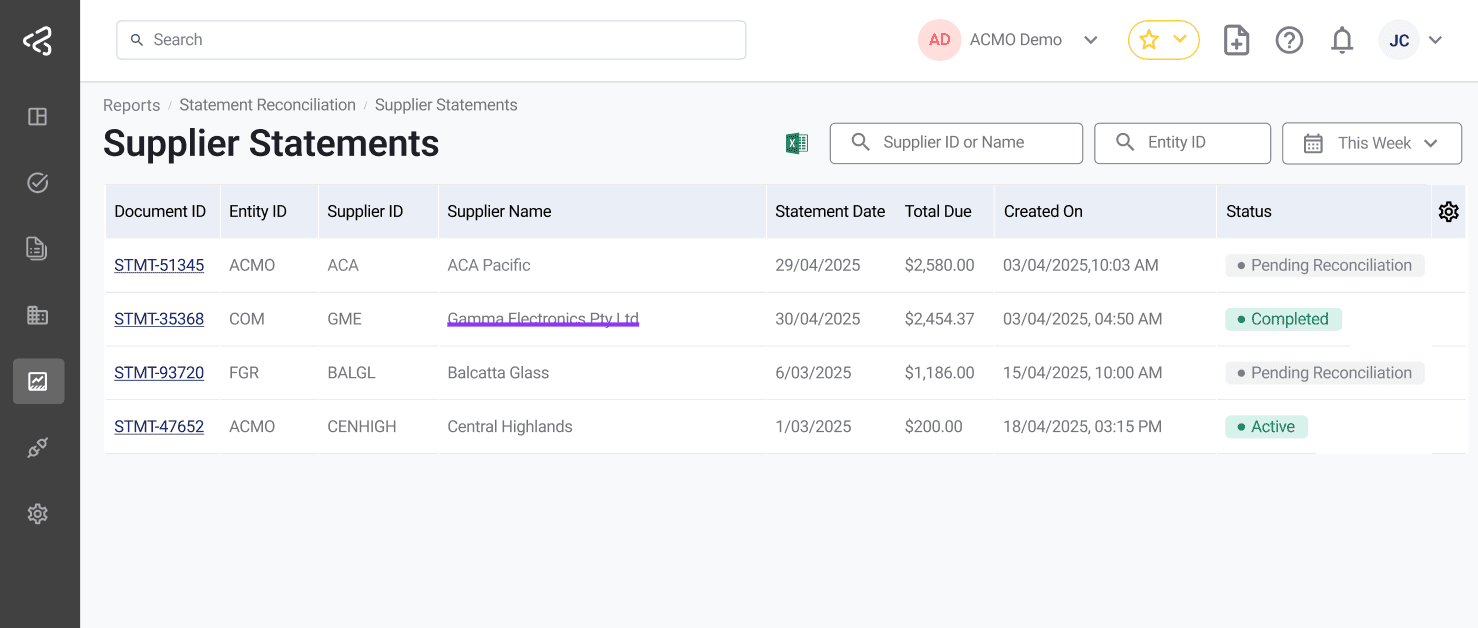
It helps users:
- Track the progress of statement reconciliation
- Identify unmatched or disputed items
- Monitor supplier balances and discrepancies
- Analyse reconciliation performance across suppliers
Key Information Displayed
Each record in the report includes:
- Document ID (prefixed with STMT)
- Supplier Name
- Business Entity
- Statement Date
- Total Due
- Created Date
- Status (e.g., Pending, Completed, Rejected)
Line-Level Insights
The report provides insights into how individual statement lines are processed, including:
- Matched invoices (paid or open)
- Unmatched or missing records
- Rejected or disputed items
- Credits and adjustments identified during reconciliation
This allows users to quickly understand the outcome of reconciliation without opening each statement individually.
Status Tracking
Users can monitor the lifecycle of statements using status indicators such as:
- Pending - Awaiting review or matching
- In Progress - Currently under review
- Completed - Successfully reconciled
- Rejected - Marked invalid or requiring re-submission
Summary
-
Centralised Visibility
Provides a single view of all supplier statements and their reconciliation status. -
Faster Issue Identification
Quickly highlights unmatched, disputed, or exception items. -
Improved Decision-Making
Enables better tracking of supplier balances and outstanding liabilities. -
Operational Efficiency
Reduces the need to manually review individual statements for status updates.