AP Module Settings
The Accounts Payable module in the ACMO Solution provides a range of configurable settings that control how bills are processed, coded, matched, and approved. These settings allow organisations to tailor the system to their operational, compliance, and risk management requirements.
Module settings can be managed from:
Settings → Module Settings → Accounts Payable
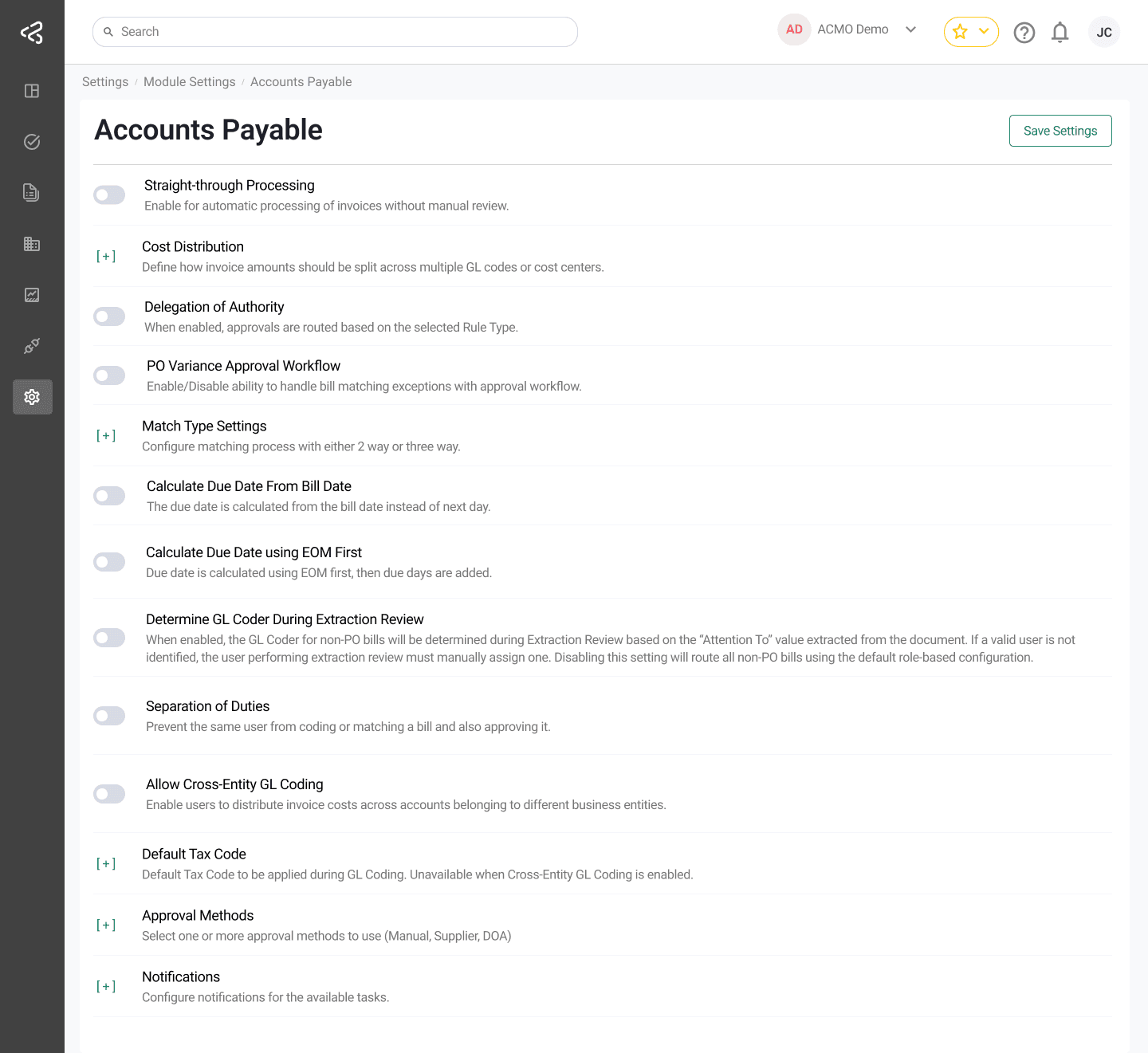
Straight-Through Processing (STP)
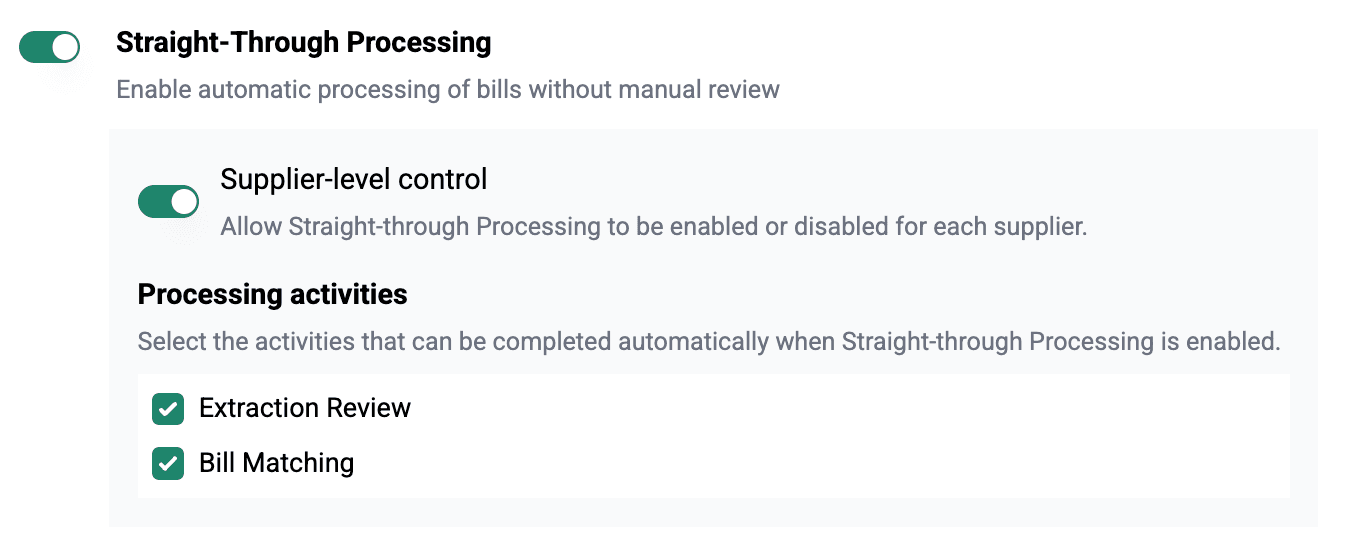
The Straight-Through Processing (STP) setting enables automated bill processing with enhanced, granular controls at both organisation and supplier levels.
-
When STP is enabled, bills that meet defined validation and matching criteria can be processed automatically without manual intervention.
-
Users must select at least one activity where STP will apply:
- Extraction Review
- Bill Matching
-
When supplier-level STP is OFF → All bills will be auto-processed
-
When supplier-level STP is ON → Only that supplier’s bills are eligible for STP
-
Processing occurs only for the modules selected during configuration
-
When STP is enabled at the Supplier level, the following options become available:
- STP can be enabled individually from the Supplier Detail Page → Settings tab
- By default, STP is OFF for all suppliers
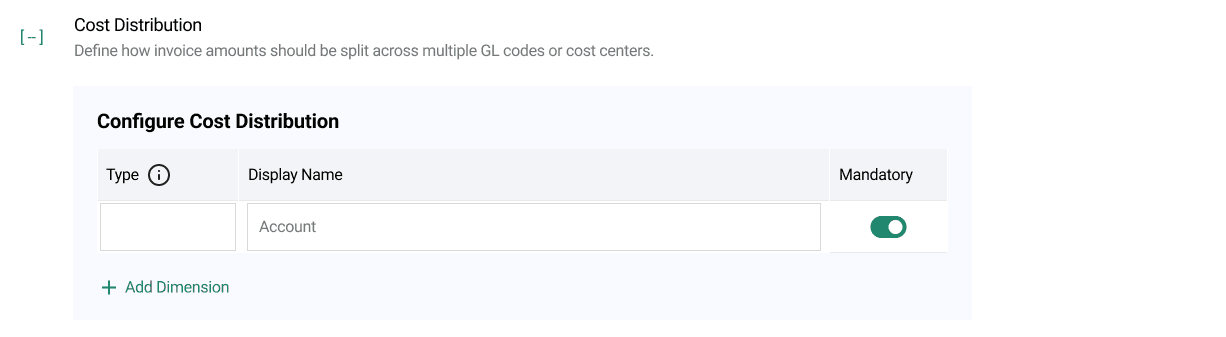
Cost Distribution
Dimensions configured here are displayed on the GL Coding task screen and enforced as mandatory or optional based on your configuration.
- Allows invoice amounts to be split across multiple:
- GL accounts
- Cost centres
- Business units or projects
- Ensures accurate expense allocation and financial reporting.
Delegation of Authority (DOA)
- Automatically routes approvals based on the configured Rule Type.
- Supported rule types include:
- Area-Based Coding: Approvers are determined based on GL codes or cost centres.
- Financial Coding: Approvers are determined based on the financial coding structure applied to the bill.
- Enforces approval policies consistently across the organisation.
PO Variance Approval Workflow
- When enabled, bills with PO matching variances (e.g., price or quantity mismatches) are routed to an exception approval workflow.
- Ensures discrepancies are reviewed and approved before posting.
Grant Access for PO Requestor
- Provides PO requestors with login access to the ACMO Solution.
- Enables requestors to:
- Review bills related to their POs
- Resolve matching exceptions that require their input
- Improves collaboration between procurement and finance teams.
Match Type Settings
- Defines the matching logic used during bill validation:
- 2-Way Match – Bill vs. Purchase Order
- 3-Way Match – Bill vs. Purchase Order vs. Goods Receipt
- Determines the level of validation applied before approval and posting.
Calculate Due Date from Bill Date
- Allows the system to calculate the payment due date starting from the bill date instead of the next calendar day.
- Provides flexibility to align with supplier payment terms.
Determine GL Coder During Extraction Review
- Applicable to Non-PO bills.
- When enabled:
- The system determines the GL Coder during the Extraction Review task.
- Uses the “Attention To” field from the bill to identify the appropriate GL Coder.
- If no valid user is identified, the reviewer must manually assign one.
- When disabled:
- Non-PO bills follow the default role-based GL coder configuration.
Separation of Duties
- Enforces compliance and internal controls by preventing the same user from:
- Coding or matching a bill, and
- Approving the same bill
- Helps maintain audit readiness and reduces risk of fraud or errors.
Allow Cross-Entity GL Coding
- Enables users to distribute invoice costs across GL accounts belonging to different business entities.
- Useful for organisations with shared services, intercompany allocations, or cross-entity cost sharing.
- When enabled, GL coding is no longer restricted to the originating business entity.
Default Tax Code
- Allows configuration of a default tax code to be automatically applied during the GL coding process.
- A drop-down list is provided for users to select the applicable default tax code.
- This option is unavailable when Allow Cross-Entity GL Coding is enabled.
- Helps ensure consistent tax treatment and reduces manual entry.
Approval Methods
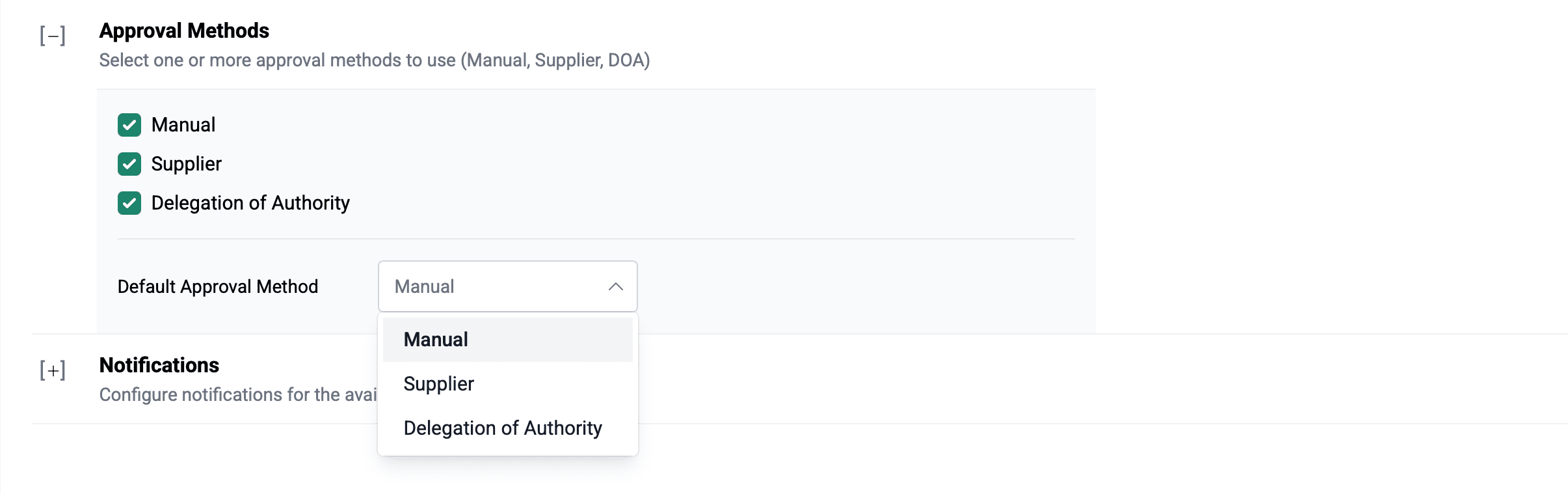
Multiple approval routing methods can be configured:
- Manual: Approver is selected manually by the user.
- Supplier: Approver is determined based on supplier-specific mappings.
- Delegation of Authority (DOA): Routing based on configured DOA rules.
A default approval method can be configured and is automatically applied when users perform GL coding.
Notifications
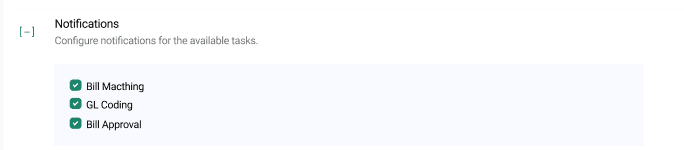
- Allows configuration of system notifications for key Accounts Payable tasks.
- Notification options are controlled using checkboxes and include:
- Bill Matching
- GL Coding
- Bill Approval
- Helps keep users informed of pending actions and improves task turnaround times.
Rejection Notifications
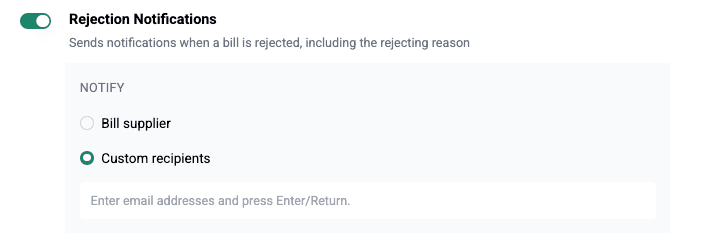
This feature introduces a configurable module setting to enable email notifications when an invoice is rejected within the Accounts Payable (AP) workflow.
-
When the notification setting is enabled, users can define the recipient strategy:
- Bill Supplier: Send notification to the supplier’s email address as maintained in the supplier master data
- Custom Recipients: Specify one or more email addresses.
-
A configurable email template is introduced to standardize rejection communication. This template will be used for all invoice rejection notifications.
-
The system automatically triggers the email notification when an invoice status changes to Rejected.
-
Emails are sent using the configured SMTP settings, or the system default if no custom configuration is provided.
-
This ensures timely and consistent communication of invoice rejections to relevant stakeholders, improving transparency and reducing follow-up efforts.
When rejecting a bill from any task screen, use the available checkbox to enable or disable rejection email notifications for that specific bill.
Identify Purchase Order from Filename
The Identify Purchase Order from Filename setting allows ACMO to identify a purchase order using the original invoice filename.

-
This feature is intended for scenarios where the purchase order number is not displayed on the invoice image, but the invoice file has been named using a controlled PO-based convention.
-
When enabled, ACMO applies a configured purchase order number pattern to the original filename before supplier identification.
-
The Purchase Order Number Pattern is a regular expression that describes the PO number formats ACMO should look for within invoice filenames.
-
The expression should describe the PO number itself rather than the complete filename. For example:
\d{5}. -
The pattern is required when the feature is enabled.
Accounting Date
The Accounting Date setting allows organisations to control how ACMO determines the accounting date applied to completed bills before they are exported or made available to the downstream ERP.
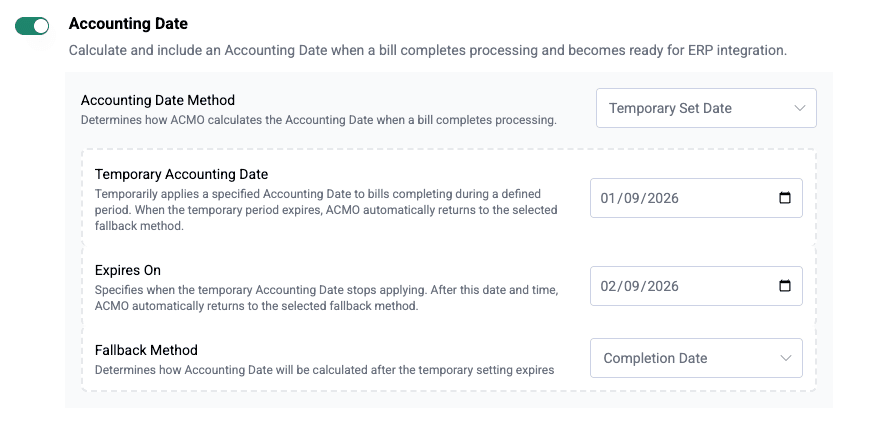
- When enabled, ACMO resolves and stores an Accounting Date against each bill once it reaches Completed / Ready for ERP status.
- The Accounting Date is not calculated while a bill is in Extraction Review, Bill Matching, GL Coding, Bill Approval, or AP Review — this prevents the date from becoming stale while a bill remains in workflow.
- This ensures straight-through bills receive an Accounting Date automatically, without manual intervention, while still supporting month-end and period-end accounting requirements.
- When disabled, existing ACMO processing remains unchanged and the Accounting Date settings below are hidden.
The resolved Accounting Date is stored against the individual bill and is not retrospectively changed if tenant Accounting Date settings are updated afterward.
Accounting Date Method
When Accounting Date is enabled, the Accounting Date Method determines how the date is calculated when a bill completes processing:
- Completion Date – Uses the date the bill completes ACMO processing and becomes ready for ERP integration. This is the recommended and default method for new configurations.
- Received Date – Uses the date the invoice was originally received by ACMO, retained even if the bill remains in workflow for several days.
- Invoice Date – Uses the invoice date extracted from or confirmed against the supplier invoice.
- Temporary Set Date – Applies a fixed Accounting Date to bills completing within a defined period, then automatically reverts to a fallback method once the period expires.
If Invoice Date is selected but no valid invoice date is available on the bill, the Accounting Date is not silently set to an incorrect value — standard validation and error handling apply.
Temporary Set Date
Temporary Set Date is intended for month-end or period-end processing. Selecting it displays the following additional fields:
- Temporary Accounting Date – The Accounting Date applied to bills completing while this setting remains active (for example,
31 Jul 2026). - Expires On – The date and time after which ACMO automatically reverts to the Fallback Method. This field is mandatory — an indefinite Temporary Accounting Date is not permitted.
- Fallback Method – The method applied once the temporary period expires. Supported options are Completion Date, Received Date, and Invoice Date.
Bills that complete before the configured expiry receive the Temporary Accounting Date. Bills that complete after the expiry automatically use the Fallback Method — no administrator action is required when the temporary setting expires.
Accounting Date in Bill Output
When Accounting Date is enabled, the resolved value is stored against the bill and included as accountingDate in the bill output JSON/API payload used by downstream ERP integrations, in YYYY-MM-DD format.
- Accounting Date is not recalculated if an ERP integration is retried — the originally resolved value is retained.
- If the ERP rejects the Accounting Date (for example, because the accounting period is closed), the bill status is updated to reflect the failure.
When Accounting Date is disabled, accountingDate is not populated in the
bill output.