Filters
Task filters are accessible via the Filter button available on each task listing page. Clicking this button opens the filter panel, which displays the set of filters that can be applied to refine task results.
While a majority of filters are common across tasks, their availability may vary depending on the task type. For example:
- PO Number is not available in GL Coding
- Document Type is only available in Extraction Review
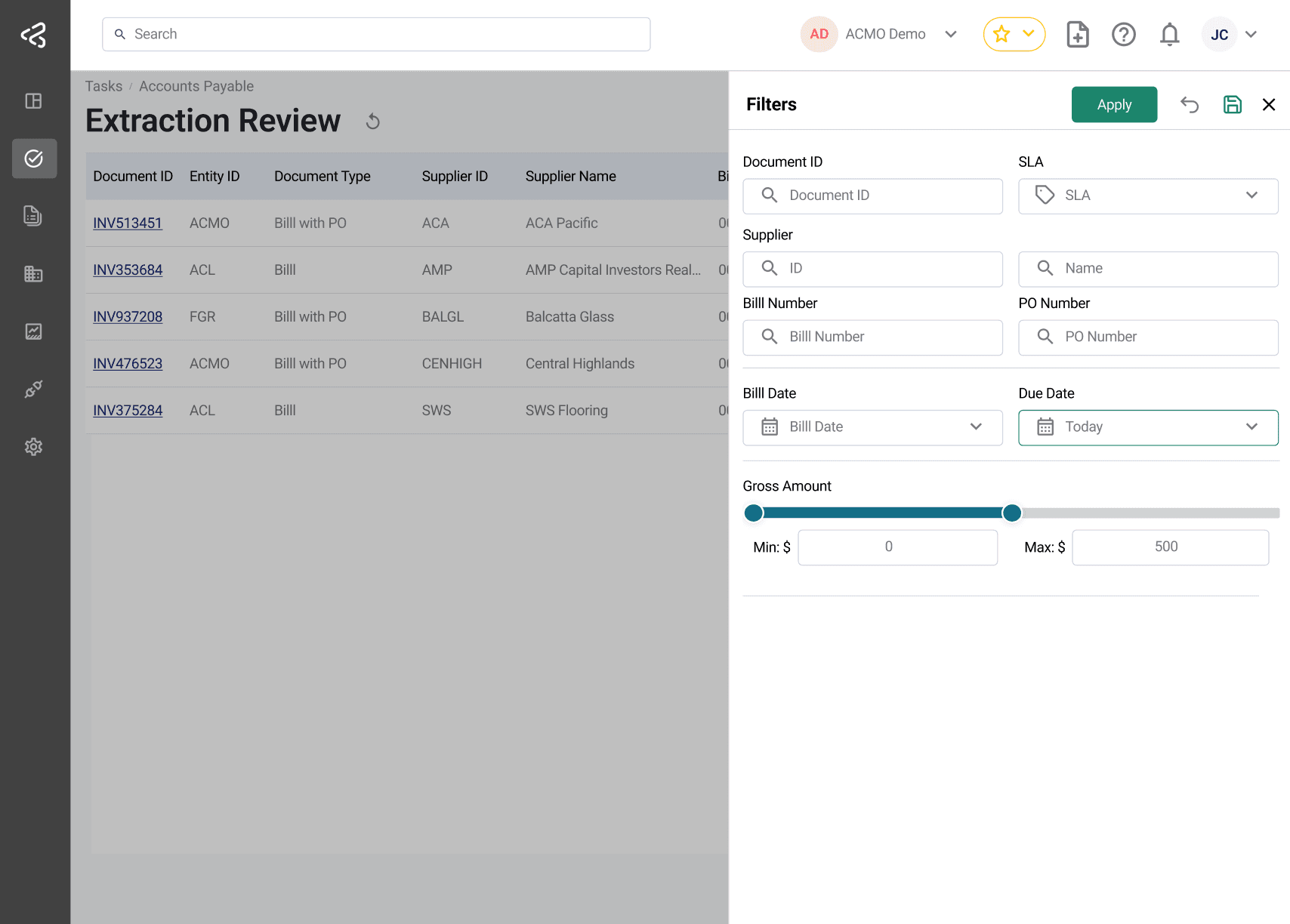
Filter Types
| Filter Name | Description |
|---|---|
| Document ID | Search by unique document identifier |
| Entity ID | Search by associated entity |
| Document Type | Filter by document category (e.g., Bill, Bill with PO, Credit Note) |
| SLA | Filter based on SLA status (Within SLA, Critical, Breached) |
| Supplier ID | Search by supplier identifier |
| Supplier Name | Search by supplier name |
| Bill Number | Search using bill/invoice number |
| PO Number | Search using purchase order number |
| Bill Date | Filter by bill date |
| Due Date | Filter by due date |
| Created On | Filter by creation date |
| Source Channel | Filter by document source (Web, Email, Sync Client, Mobile, Peppol, API) |
| Gross Amount | Filter by amount range using min/max slider |
| Payment ID | Search using payment identifier |
| Payment Date | Filter by payment date |
| Total Amount | Filter by total payment amount range |
| Customer ID | Search by customer identifier |
| Customer Name | Search by customer name |
| Payment Reference | Search using payment reference |
| Payment Amount | Filter by payment amount range |
| Status | Filter by task or document status (varies by task) |
Filter Availability Matrix
Accounts Payable (AP)
| Filter Name | Fraud Review | Extraction Review | Bill Matching | GL Coding | AP Review |
|---|---|---|---|---|---|
| Document ID | ✓ | ✓ | ✓ | ✓ | ✓ |
| Entity ID | ✓ | ✓ | ✓ | ✓ | ✓ |
| Document Type | ✓ | ✓ | - | - | - |
| SLA | ✓ | ✓ | ✓ | ✓ | ✓ |
| Supplier ID | ✓ | ✓ | ✓ | ✓ | ✓ |
| Supplier Name | ✓ | ✓ | ✓ | ✓ | ✓ |
| Bill Number | ✓ | ✓ | ✓ | ✓ | ✓ |
| PO Number | ✓ | ✓ | ✓ | - | - |
| Bill Date | ✓ | ✓ | ✓ | ✓ | ✓ |
| Due Date | ✓ | ✓ | ✓ | ✓ | ✓ |
| Created On | ✓ | ✓ | ✓ | ✓ | ✓ |
| Source Channel | ✓ | ✓ | ✓ | ✓ | ✓ |
| Gross Amount | ✓ | ✓ | ✓ | ✓ | ✓ |
Bill Documents
| Filter Name | Available |
|---|---|
| Document ID | ✓ |
| Entity ID / Name | ✓ |
| Supplier ID / Name / ABN | ✓ |
| Bill Number | ✓ |
| PO Number | ✓ |
| Bill Date | ✓ |
| Due Date | ✓ |
| Created On | ✓ |
| Status | ✓ |
| Gross Amount | ✓ |
Accounts Receivable (AR)
| Filter Name | Cash Allocation | Remittance Review |
|---|---|---|
| Payment ID | ✓ | - |
| Payment Date | ✓ | ✓ |
| Created On | ✓ | - |
| Total Amount | ✓ | - |
| Document ID | - | ✓ |
| SLA | - | ✓ |
| Customer ID | - | ✓ |
| Customer Name | - | ✓ |
| Payment Reference | - | ✓ |
| Payment Amount | - | ✓ |
Remittance Documents
| Filter Name | Available |
|---|---|
| Remittance ID | ✓ |
| Payment Reference | ✓ |
| Status | ✓ |
| Payment Amount | ✓ |
PO Line Filters
In addition to the standard task filters described above, the Bill Matching task detail screen provides a dedicated set of filters for narrowing down the Purchase Order (PO) line items shown against the bill being matched. These filters make it easy to quickly locate the specific PO lines you need to work on, especially when a PO contains a large number of lines.
These filters are only available on the Bill Matching task detail screen (the screen used to match an individual bill), and apply only to the PO line items displayed for that bill. They are separate from the task listing filters used to search and filter bills on the Bill Matching task list.
Filter Types
| Filter Name | Description |
|---|---|
| Line Number | Filter by the PO line number |
| Release Number | Filter by the release number associated with a blanket PO |
| Description | Filter by the line item description |
| Unit Price | Filter by unit price using a min/max range slider |
| Quantity Ordered | Filter by ordered quantity using a min/max range slider |
| Net Amount | Filter by net amount using a min/max range slider |
Behavior
- These filters run entirely on the client side, so results are applied instantly without calling the server.
- Only one filter can be applied at a time. Applying a new filter automatically clears any previously applied filter — unlike the standard task filters above, which can be combined.
- The Unit Price, Quantity Ordered, and Net Amount filters are presented as sliders, allowing users to define a minimum and maximum value to narrow the results.
Saved Filters
- Users can apply filters and save them for future use
- A name is required when saving a filter
- Saved filters are accessible via the Saved Filters menu next to the Filter button
- Newly saved filters are added to this menu for quick access
Additional Behavior
- Applying a saved filter allows:
- Modification and re-saving
- Deletion of the saved filter
- Clearing filters using the Clear icon:
- Resets all applied filters
- Also clears any active sorting on the screen